Page 1 of 1
Theme and Visual Style
Posted: Fri Jul 01, 2022 12:20 pm
by MegumiSawada
Hi all,
I would like to implement a form with the appearance like 2007Olive but with other color(e.g. Pink!).
I believe I need to create my own Theme looks like 2007Olive(Pink colored background and so on), but the appearance of push buttons will look different.
Do you have any idea to use my own Theme with 2007Olive like buttons(I guess it's boardersyle is Raised)?
I think I can create Visual Style for buttons but it will be ignored when using original Theme.
Thank you in advance for your advice!
Best Regards,
Megumi Sawada
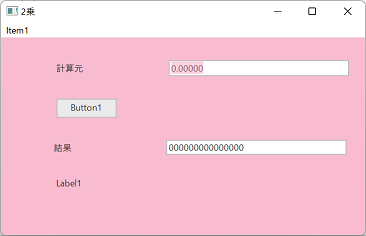
- Original File
- OriginalTheme.png (9.91 KiB) Viewed 7918 times
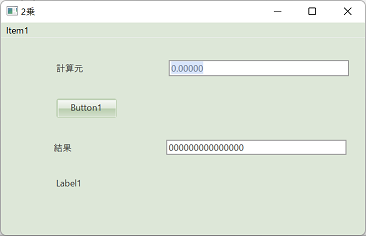
- 2007Olive
- 2007Olive.png (10.58 KiB) Viewed 7918 times
Re: Theme and Visual Style
Posted: Wed Jul 06, 2022 6:44 am
by Dino
Not really sure what change in the style will produce this kind like a reflection in the button...
but if you create a new theme, for windows, you can add your own draw styles in a theme for example:
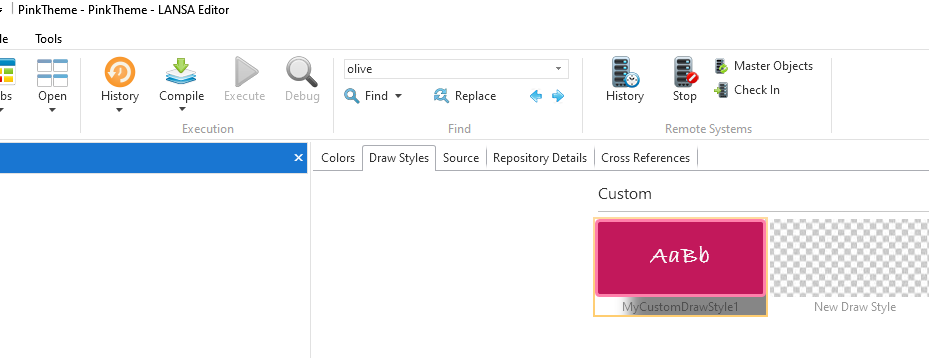
- pink01.png (41.94 KiB) Viewed 7889 times
which in the source finally will looks like:
Code: Select all
Begin_Com Role(*EXTENDS #PRIM_THM) BaseTheme(2015Pink) ThemeAccentDarkColor('#fbc02d') ThemeAccentLightColor('#fff176') ThemeAccentMediumColor('#ffeb3b')

Define_Com Class(#PRIM_THM.DrawStyle) Name(#MyCustomDrawStyle1) Style(#Style1)
Define_Com Class(#PRIM_VS.Style) Name(#Style1) Effect(#DropShadow1) BackgroundBrush(#Brush1) BorderBottom(3) BorderBrush(#Brush2) BorderLeft(3) BorderRight(3) BorderTop(3) CornerBottomLeft(3) CornerBottomRight(3) CornerTopLeft(3) CornerTopRight(3) Shape(Rounded) FaceName('Bradley Hand ITC') FontWeight(Normal) FontSize(18) ForegroundBrush(#Brush3) Bold(True)
Define_Com Class(#PRIM_VS.SolidBrush) Name(#Brush3) Color(248:248:248)
Define_Com Class(#PRIM_VS.SolidBrush) Name(#Brush2) Color(ThemeA100)
Define_Com Class(#PRIM_VS.SolidBrush) Name(#Brush1) Color(Theme700)
Define_Com Class(#PRIM_VS.DropShadow) Name(#DropShadow1) ShadowDepth(50) BlurRadius(20)
End_Com
when added to a form it will look like:
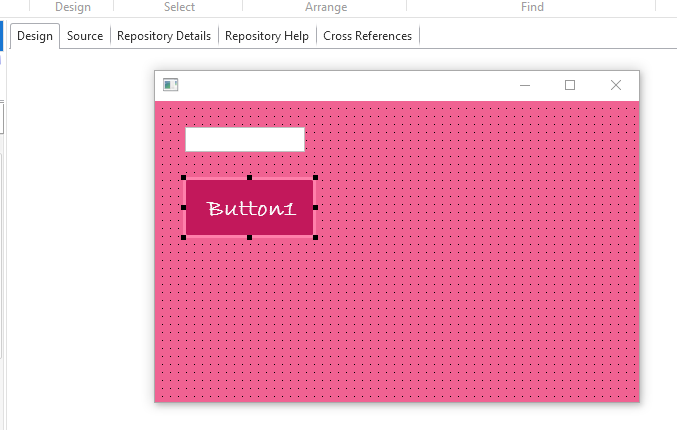
- pink02.png (8.96 KiB) Viewed 7889 times
Code: Select all
Function Options(*Direct)
Begin_Com Role(*EXTENDS #PRIM_FORM) ClientWidth(484) ClientHeight(301) ComponentVersion(2) Left(598) Top(192) Theme(#PinkTheme) ThemeDrawStyle('LightTitle')
Define_Com Class(#PRIM_EDIT) Name(#Edit1) DisplayPosition(1) Left(30) Parent(#COM_OWNER) ShowSelection(False) ShowSelectionHilight(False) TabPosition(1) Top(26)
Define_Com Class(#PRIM_PHBN) Name(#Button1) Caption('Button1') DisplayPosition(2) Left(28) Parent(#COM_OWNER) TabPosition(2) Top(76) ThemeDrawStyle('CustomBut+MyCustomDrawStyle1') Height(61) Width(133)

Evtroutine Handling(#com_owner.CreateInstance)
Set Com(#com_owner) Caption(*component_desc)
Endroutine
End_Com
Re: Theme and Visual Style
Posted: Tue Jul 19, 2022 10:31 am
by MegumiSawada
HI DIno,
Thank you for your reply.
I'll struggle a bit more...
Best Regards,
Megumi Sawada