Page 1 of 1
Categorized property sheet
Posted: Wed Jul 20, 2022 4:07 pm
by Taku Izumi
Hi,
On a form application, I want to make a categorixed property sheet with a design similar to the property sheet in the LANSA editor.
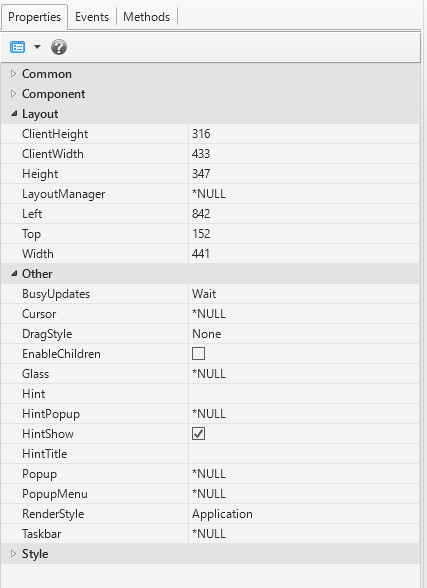
- PropertySheet.PNG (14.27 KiB) Viewed 10740 times
Does anyone know how to make it?
Regards,
Taku Izumi
Re: Categorized property sheet
Posted: Thu Jul 21, 2022 3:09 am
by Dino
There is a "similar" example, Web Page called xDemoWebMoreLess in the samples provided.
This could be used as a dirty (over simplified) example based on that sample...
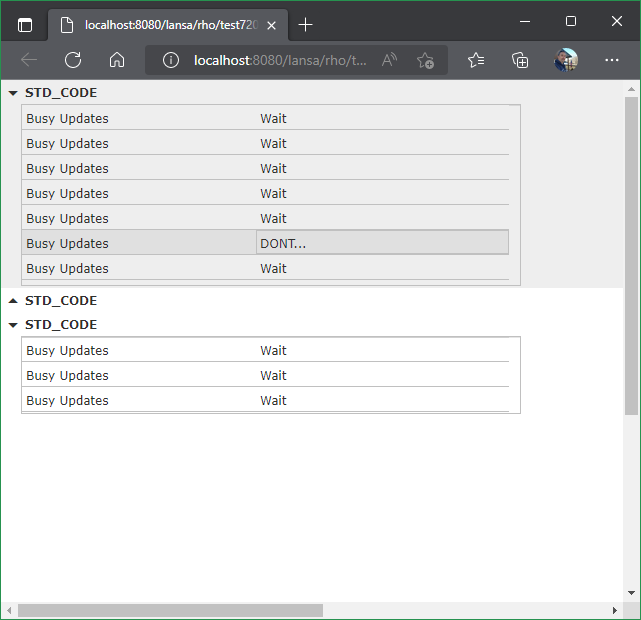
- drill.png (26.56 KiB) Viewed 10732 times
Web Page test720:
Code: Select all
Begin_Com Role(*EXTENDS #PRIM_WEB)

Define_Com Class(#PRIM_TREE<#TEST720R>) Name(#Tree) DisplayPosition(1) Height(800) Left(0) Parent(#COM_OWNER) TabPosition(1) Top(0) Width(1200)
Define_Com Class(#prim_acol<#std_code>) Name(#categories)

Evtroutine Handling(#COM_OWNER.Initialize)
#categories.RemoveAll
#std_code := 'XYZ'
#categories.Insert( (*New #std_code) )
#std_code := 'ABC'
#categories.Insert( (*New #std_code) )
#std_code := 'QWE'
#categories.Insert( (*New #std_code) )

For Each(#category) In(#categories)
Add_Entry To_List(#Tree)

#Tree.CurrentItem.RelatedReference <= #category
Endfor
Endroutine
End_Com
which uses reusable part test720r:
Code: Select all
Function Options(*Direct)
Begin_Com Role(*EXTENDS #PRIM_PANL *implements #Prim_Tree.iTreeDesign) DisplayPosition(1) Height(121) Left(0) TabPosition(1) Top(0) Width(537) ThemeDrawStyle('ListItem')

Define_Com Class(#PRIM_LABL) Name(#CategoryName) Caption('Other Category') DisplayPosition(2) Ellipses(Word) Left(24) Parent(#COM_OWNER) TabPosition(1) TabStop(False) VerticalAlignment(Center) Height(24) Width(104) Top(0) ThemeDrawStyle('Strong')

Define_Com Class(#PRIM_LIST) Name(#List) ColumnHeaderHeight(0) ColumnLines(False) DisplayPosition(3) Height(153) Parent(#COM_OWNER) RowHeight(24) TabPosition(2) Top(24) Width(500) Left(20)
Define_Com Class(#PRIM_LIST.String) Name(#ListColumn1) ColumnWidth(231) DisplayPosition(1) Parent(#List) SortOnClick(True) Source(#STD_DESC)
Define_Com Class(#PRIM_LIST.String) Name(#ListColumn2) ColumnWidth(250) DisplayPosition(2) Parent(#List) SortOnClick(True) Source(#STD_STRNG) ColumnReadOnly(False)
Define_Com Class(#PRIM_MD.Icon) Name(#Icon) DisplayPosition(1) Icon('arrow_drop_down') Left(0) Parent(#COM_OWNER) TabPosition(3) Top(0) Height(27) Width(24)

Mthroutine Name(OnItemGotReference) Help('Executed when the item "RelatedReference" property is set') Options(*Redefine)
#STD_STRNG := #TreeItem.RelatedReference *As #std_code
#CategoryName.Caption := #TreeItem.RelatedReference.Name
#COM_OWNER.ExpandOrNot
Endroutine
Evtroutine Handling(#Icon.Click)
#COM_OWNER.ExpandOrNot
Endroutine
Mthroutine Name(ExpandOrNot)
#List.Visible := *Not #List.Visible
Clr_List Named(#List)
If (#List.Visible)
#Icon.Icon := 'arrow_drop_down'
#STD_DESC := 'Busy Updates'
#STD_STRNG := 'Wait'
#STD_NUM := (#datetimex.Now.Time.Second.Mod( 8 ))
If (#STD_NUM < 3)
#STD_NUM := 3
Endif
Begin_Loop To(#STD_NUM)
Add_Entry
End_Loop
#List.Height := 26 * (#List.Items.ItemCount)
#COM_OWNER.Height := 26 * (#List.Items.ItemCount + 1)
Else
#Icon.Icon := 'arrow_drop_up'
#List.Height := 0
#COM_OWNER.Height := 24
Endif
Endroutine
End_Com
Re: Categorized property sheet
Posted: Thu Jul 21, 2022 9:16 am
by Taku Izumi
HI Dino.
Thank you much!
Based on this sample, I will make a Windows form application.
Regards,
Taku