Page 1 of 1
IconColor of Radio Button
Posted: Tue Aug 02, 2022 4:29 pm
by MegumiSawada
Hi all,
I set IconColor for Radio Button.
When the mouse is over it, the color which I set is used. However, when the mouse is not over it, the color will be much lighter.
The opacitiy is fewer...?
I would like to show the Radio Button all the time in the selected color in opacity 100%.
Is there any way to do that?
I tried with style, but Style seems to change the whole color(including text) and also opacity will be changed when mouse over and not .
Code: Select all
Define_Com Class(#PRIM_MD.RadioButton) Name(#RDBTN1) Displayposition(3) Left(96) Parent(#COM_OWNER) Tabposition(1) Iconcolor(50:160:25) Iconheight(20) Top(112) Caption('Radio Button 1') Width(120) Height(24)
The mouse is over Radio Button 1 on the following screen shot. you can see the difference of colors.
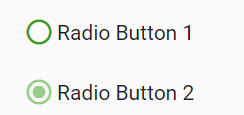
- RadioButton.png (6.31 KiB) Viewed 9176 times
Best Regards,
Megumi
Re: IconColor of Radio Button
Posted: Wed Aug 03, 2022 3:48 am
by Dino
I notice the effect you mention with the radio button, but I don t see any property to be able to control it by default.
https://docs.lansa.com/15/en/lansa016/c ... BUTTON.htm
There are dragStyle, focusStyle, mouseOverStyle but they are for windows, no web.
Maybe you will need to have there a new property like OpacityAmount for Hover or something like that.
Saying so, if you need to create a particular variation of a Radio Button or other component a solution is to create a reusable part
like Test82RadioButton and use it in your webpage, that way you can have all the control in that component.
For example a reusable part (panel) #test82RadioButton could look like this:
Code: Select all
Function Options(*Direct)
Begin_Com Role(*EXTENDS #PRIM_PANL) DisplayPosition(1) TabPosition(1) Left(0) Top(0) Height(24) Width(201) LayoutManager(#Layout1)

Define_Com Class(#PRIM_TBLO) Name(#Layout1)
Define_Com Class(#PRIM_TBLO.Row) Name(#Layout1Row1) DisplayPosition(1) Parent(#Layout1)
Define_Com Class(#PRIM_TBLO.Column) Name(#Layout1Column1) DisplayPosition(1) Parent(#Layout1)
Define_Com Class(#PRIM_TBLO.Item) Name(#Layout1Item1) Alignment(TopCenter) Column(#Layout1Column1) Manage(#Text) Parent(#Layout1) Row(#Layout1Row1)

Define_Com Class(#PRIM_MD.Label) Name(#Text) Caption('Text') DisplayPosition(1) Left(0) Parent(#COM_OWNER) TabPosition(1) Top(0) Icon('radio_button_unchecked') Height(24) Width(201)

Define_Pty Name(Checked) Get(GetChecked) Set(SetChecked)
Define_Pty Name(Caption) Set(SetCaption)
Define_Pty Name(IconColor) Set(SetIconColor)
Define_Evt Name(Changed)

Ptyroutine Name(SetChecked)
Define_Map For(*Input) Class(#std_bool)
If (#STD_BOOL = TRUE)
#Text.Icon := 'radio_button_checked'
Else
#Text.Icon := 'radio_button_unchecked'
Endif
Endroutine
Ptyroutine Name(GetChecked)
Define_Map For(*Output) Class(#Std_bool)
If (#Text.Icon = 'radio_button_unchecked')
#STD_BOOL := "FALSE"
Else
#STD_BOOL := "TRUE"
Endif
Endroutine
Evtroutine Handling(#Text.Click)
If (#Text.Icon = 'radio_button_unchecked')
#Text.Icon := 'radio_button_checked'
Else
#Text.Icon := 'radio_button_unchecked'
Endif
Signal Event(Changed)
Endroutine
Ptyroutine Name(SetCaption)
Define_Map For(*Input) Class(#STD_STRNG)
#Text.Caption := #STD_STRNG
Endroutine
Ptyroutine Name(SetIconColor)
Define_Map For(*Input) Class(#STD_STRNG)
#Text.IconColor := #STD_STRNG
Endroutine
End_Com
and used in a web page like this:
Code: Select all
Begin_Com Role(*EXTENDS #PRIM_WEB) Theme(#SYS_THEME<MaterialDesignBlue>)
Define_Com Class(#PRIM_MD.RadioButton) Name(#RDBTN1) DisplayPosition(3) Left(96) Parent(#COM_OWNER) TabPosition(3) IconHeight(20) Caption('Radio Button 1') Width(120) Height(24) ThemeDrawStyle('ForegroundMediumPrimary')
Define_Com Class(#PRIM_MD.RadioButton) Name(#RDBTN2) DisplayPosition(2) Left(96) Parent(#COM_OWNER) TabPosition(2) IconHeight(20) Top(50) Caption('Radio Button 2') Width(120) Height(24) ThemeDrawStyle('ForegroundMediumPrimary')
Define_Com Class(#PRIM_MD.RadioButton) Name(#RDBTN3) DisplayPosition(1) Left(96) Parent(#COM_OWNER) TabPosition(1) IconHeight(20) Top(90) Caption('Radio Button 3') Width(120) Height(24) ThemeDrawStyle('ForegroundMediumPrimary')
Define_Com Class(#Test82RadioButton) Name(#Test82RadioButton1) DisplayPosition(4) Left(96) Parent(#COM_OWNER) TabPosition(4) TabStop(False) Top(130)
Define_Com Class(#Test82RadioButton) Name(#Test82RadioButton2) DisplayPosition(5) Left(96) Parent(#COM_OWNER) TabPosition(5) TabStop(False) Top(170)
Evtroutine Handling(#Com_owner.Initialize)
#Test82RadioButton1.Caption := 'Radio Button 1'
#Test82RadioButton1.IconColor := '50:160:25'
#Test82RadioButton1.Checked := "TRUE"
#Test82RadioButton2.Caption := 'Radio Button 2'
#Test82RadioButton2.IconColor := '50:160:25'
Endroutine

Evtroutine Handling(#Test82RadioButton1.Changed #Test82RadioButton2.Changed)
* #sys_web.Alert Caption(#Test82RadioButton1.Checked + '--' + #Test82RadioButton2.Checked)
Endroutine
End_Com

- radiobutton1.png (12.14 KiB) Viewed 9171 times
Re: IconColor of Radio Button
Posted: Thu Aug 04, 2022 12:17 pm
by MegumiSawada
Hi Dino,
Thank you for your advice.
I have acheived the requirement based on your advice.
Thank you again!
Best Regards,
Megumi