Page 1 of 1
VLF ONE - How to pre-setting Arrange Horizontally
Posted: Thu Sep 29, 2022 5:50 pm
by Taku Izumi
Hi,
Is there a way to preset the arrangement of VLF ONE horizontally?
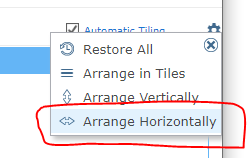
- Arrange_Setting.PNG (6.28 KiB) Viewed 20212 times
In this topics, Mark said that the default setting is Vertically.
viewtopic.php?f=3&t=1765
However, this is an old topic for 2018.
I'm looking for enhancements for this in the latest VLF EPC150005.
Best regards,
Taku
Re: VLF ONE - How to pre-setting Arrange Horizontally
Posted: Tue Oct 04, 2022 6:10 am
by Dino
Hi Taku
You will need to create an enhancement request.
I have seen some changes to default parameters for VLF-ONE but they don't include the arrange of the elements in the screen.
One element at the time can be achieved running VLF-ONE in tablet mode. Have you tried that mode? Still want you want to achieve is more than one windows at the same time one in top of the other?
Re: VLF ONE - How to pre-setting Arrange Horizontally
Posted: Tue Oct 04, 2022 7:06 am
by davidbalansa
Hi Taku,
There are a number of user capabilities that can be set in the IIP component. I haven't looked at them for many years. There may be properties that could help you.
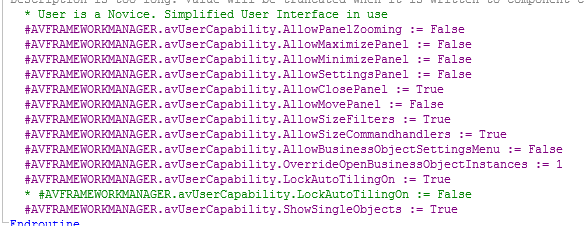
- Capture.PNG (23.32 KiB) Viewed 20158 times
Regards,
David
Re: VLF ONE - How to pre-setting Arrange Horizontally
Posted: Wed Oct 05, 2022 4:32 pm
by Taku Izumi
Hi Dino and David,
Thank you for your advice.
Tablet mode was not suitable as the customer wanted to see the instance list and command handlers side by side like VLFWIN.
And, I was able to set some properties in the IIP, there was no property of the arrange of the elements.
So, I will send an enhancement request for this.
Thanks,
Taku