Page 1 of 1
Blobs
Posted: Fri Dec 02, 2022 9:52 am
by Fromm603
Is there a way to incorporate a PDF that's on my IFS into a Blob in LANSA?
I use LANSA to create my database (let's say an invoice file). It allows me the paper clip icon to attach documents using the UI. Well now I have an IBMi job that creates a PDF on my IFS, that I'd like to make available in the attachments of that invoice UI I created.
Is there a way to do this in LANSA?
Re: Blobs
Posted: Wed Dec 07, 2022 6:18 am
by Dino
well, if you are in the server, you already have access to the IFS and to make a blob get a file, is just matter of pointing to it, like this
Then a server routine (#Test126bls.retblob) like this can capture the object from the ifs, let's use an image for an example, and return it to a web page to be displayed:
Code: Select all
Begin_Com Role(*EXTENDS #PRIM_SRVM)
Srvroutine Name(retblob)
Field_Map For(*OUTPUT) Field(#std_blob)
If ('*OSAPI = IBMI')
#std_blob := '/tmp/logoimage.png'
Else
#std_blob := 'C:\temp\logoimage.png'
Endif
Endroutine
End_Com
and for test, this web page shows that image:
Code: Select all
Begin_Com Role(*EXTENDS #PRIM_WEB) Theme(#SYS_THEME<MaterialDesignBlue>)

Define_Com Class(#PRIM_IMAG) Name(#Image) DisplayPosition(1) Image(#xImageImage32) ImageSizing(None) Left(82) Parent(#COM_OWNER) TabPosition(1) TabStop(False) Top(71) Height(234) Width(295)

Evtroutine Handling(#Com_owner.Initialize)
Define_Com Class(#test126bls.retblob) Name(#retBlob)
#retBlob.Execute std_blob(#std_blob)
#Image.Image <= #SYS_APPLN.CreateBitmap( #std_blob )
Endroutine
End_Com
tested, works fine both in ibm and windows.
please post the questions in the questions section, not in tips
Re: Blobs
Posted: Wed Dec 07, 2022 7:17 am
by Fromm603
Thanks Dino. I suspect I am not clear on my question. And shall post in the questions section in the future (I don't know what I was thinking)....
Re: Blobs
Posted: Wed Dec 07, 2022 7:49 am
by Dino
If you have a table where you want to store that file from the ifs,
lets say, that table have #id and #std_blob fields,
you can do something like this
Code: Select all
#std_blob := '/tmp/supportdocument.pdf'
insert (#id #std_blob) attachmentsfile
Re: Blobs
Posted: Thu Dec 08, 2022 8:01 am
by Fromm603
Dino,
I created a standard file maintenance using LANSA. I told it what file I wanted to use. It did the rest, including a nice paperclip icon (for attachments), and then 1 for notes. It works great. The user can manually add attachments, and they are stored as BLOBS, as best I Know.
So now, I have IBMi programs and another tool that creates PDFs and emails then, and stores a copy on the IFS.
So what I am trying to do is take that PDF generated by, in this case, the invoice print program and attach it to the invoice that is on the LANSA screen. I wish I could add a print screen, it might make my question clearer. (Or if I could email the print screen directly to you).
I appreciate your help!!!
LOL, then of course if the user could change that attached PDF without having to download it, change it, then save it, then upload it once again. More of a document management system.
So much I'd like to do, but simply don't have the skills to do so.
Re: Blobs
Posted: Thu Dec 08, 2022 9:50 am
by Dino
I see.
The LANSA template to create a basic web page, uses some sample tables.
xAssociatedAttachments is the table where it stores the blobs.
The program that populates that table, based on the graphical file upload interface, is the xAttachmentDialog dialog
and the mthroutine QueueFileforUpload is the one that prepares the information needed to insert a record in that table
Code: Select all
Mthroutine Name(QueueFileforUpload)
Define_Map For(*INPUT) Class(#prim_alph) Name(#Name)
Define_Map For(*INPUT) Class(#prim_alph) Name(#MimeType)
Define_Map For(*INPUT) Class(#std_Int) Name(#Size)
Define_Map For(*INPUT) Class(#STD_BLOB) Name(#Blob)
.....
#xAttachmentOwnerType := #COM_OWNER.CurrentOwnerType
#xAttachmentOwnerKey := #COM_OWNER.CurrentOwnerKey
#xAttachmentFileSize := #Size
#xAttachmentFileName := #Name
#xAttachmentMIMEType := #MimeType
#xAttachmentGUID := *NULL
#xAttachmentBLOB := #Blob
Add_Entry To_List(#FilesToSaveList)
....
Endroutine
the actual save, is in the line
Code: Select all
#Save.Execute FromFullWorkingList(#FilesToSaveList)
where you pass that list to the server module to perform the actual INSERT in the table.
There are many ways to do this, depending on what you want to do, but you could create your own custom version
of this dialog and add an option to enter the name of the file in the IFS, then add_entry to this
list #FilesToSaveList and it will be saved together with the rest.
Re: Blobs
Posted: Thu Jun 29, 2023 4:22 am
by adale
Dino,
Can you clarify something for me; when working with the xAttachmentDataServer, in the SrvRoutine(SAVE), where exactly does the file get loaded to the IFS? I see the name of the file gets loaded into the xAssociatedAttachments table, but where is the actual BLOB (.PDF, .JPG, .TXT, etc) file get stored in the IFS?
Re: Blobs
Posted: Thu Jun 29, 2023 6:50 am
by Dino
the blob is stored in the table.
if you are trying to exchange the blob or open it,
temporarly or momentairly,
it could be stored in a tmp folder in the lansa installation folder
in the ifs. if you want to store it permanently in the ifs, you need to copy
the ifs from that location to their final destination.
for example as show here:
viewtopic.php?f=3&t=2408&p=6901&hilit=s ... mand#p6901
Re: Blobs
Posted: Fri Jun 30, 2023 2:49 am
by adale
In regards to the table (file on IBM i ), I can see that this file is increasing in size as I add attachments:
IXATCHMNT file size testing
Start of testing:
675840
add curbstone whitepaper 542kb
1232896
add A80 datasheet
2174976
add D190 datasheet
6369280
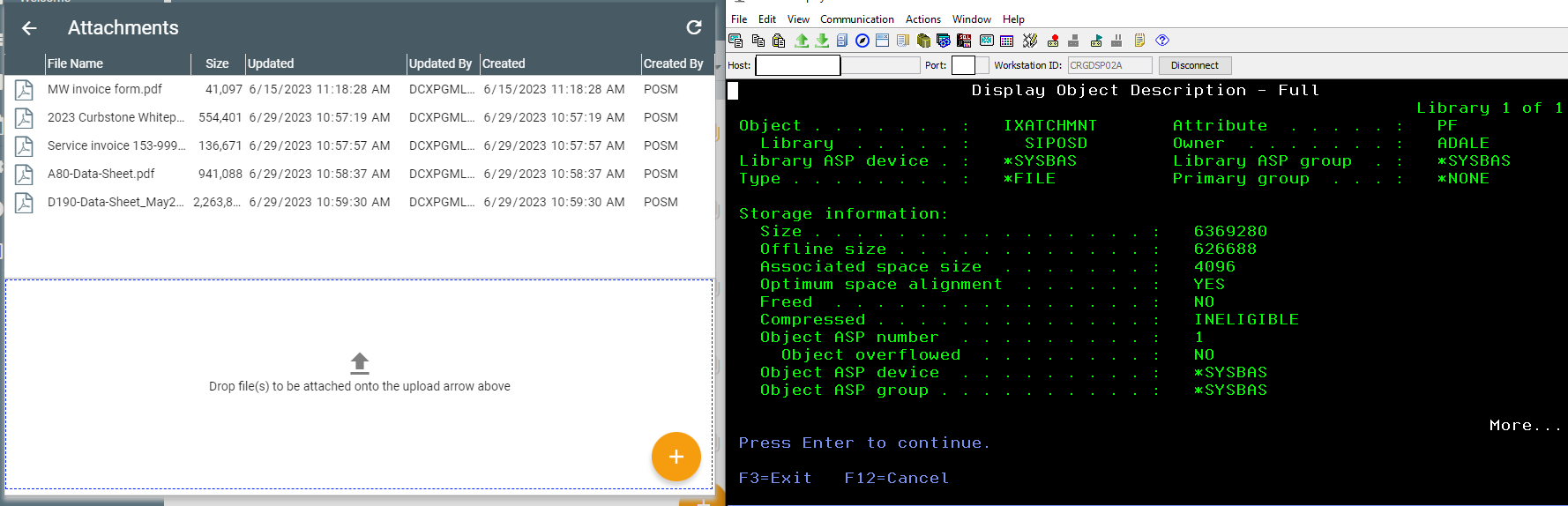
- XATCHMNT file size with attachments.png (83.31 KiB) Viewed 214665 times
But, when I then go back and DELETE the attachments, the file size does not change.
My assumption is that we would need to run a RGZPFM to reclaim the lost (deleted) space?
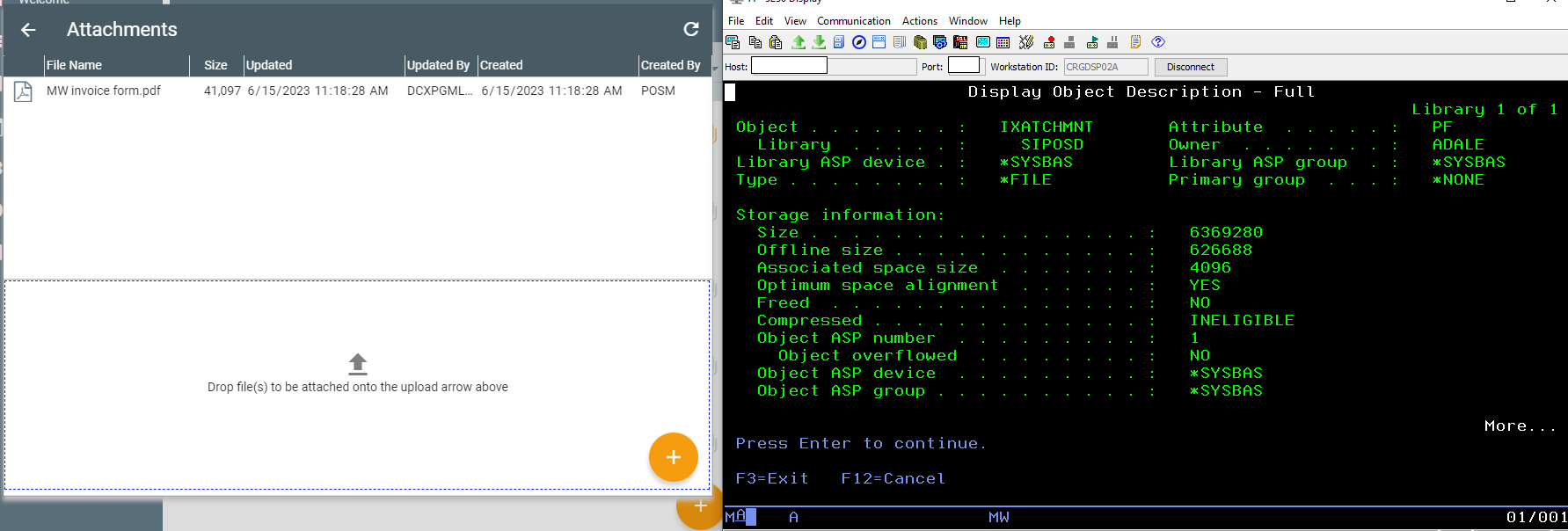
- XATCHMNT file size with attachments DELETED.png (56.33 KiB) Viewed 214665 times
Re: Blobs
Posted: Fri Jun 30, 2023 2:53 am
by Dino
yes