The world was certainly a more colorful one when those graphics were released, probably in the 90's.
I dont think those native chart graphics have been updated much from that time or given with more
properties to control fine detail.
Nowadays, the idea is to keep just very few colors in the screens and the Google charts set an example
and we can use those, plus the new Charts available as material controls for web pages deliver that.
I understand that you dont use web pages, but this could be a good reason for it.
In order to use them in a windows form, you need to show them in a web page inside the form,
even when the web page could be served by the same machine or in a centralized one.
An example of that will be reusable part DF_WEBBR that shows a web page using this line:
Code: Select all
Define_Com Class(#DF_WEBAC.WebBrowser) Name(#WEBBROWSER) DisplayPosition(1) Height(290) Hint(*MTXTDF_WEBBR) Left(0) Parent(#BODY_PANEL) TabPosition(1) Top(0) Width(512) VisualStyleOfParent(False)
Then you can create a web page, for example this one (which is using themes, layout):
Code: Select all
Begin_Com Role(*EXTENDS #PRIM_WEB) Theme(#SYS_THEME<MaterialDesignBlue>) LayoutManager(#Layout1)

Define_Com Class(#PRIM_TBLO) Name(#Layout1) MarginBottom(10) MarginLeft(10) MarginRight(10) MarginTop(10)
Define_Com Class(#PRIM_TBLO.Row) Name(#Layout1Row1) DisplayPosition(1) Parent(#Layout1)
Define_Com Class(#PRIM_TBLO.Column) Name(#Layout1Column1) DisplayPosition(1) Parent(#Layout1)
Define_Com Class(#PRIM_TBLO.Item) Name(#Layout1Item1) Alignment(TopCenter) Column(#Layout1Column1) Manage(#BarChart) Parent(#Layout1) Row(#Layout1Row1)

Define_Com Class(#PRIM_CHRT.BarChart) Name(#BarChart) DisplayPosition(1) GridLines(None) Height(780) Parent(#COM_OWNER) TabPosition(1) TabStop(False) Width(1180)
Define_Com Class(#PRIM_CHRT.BarChartCaption) Name(#BarChartCaption) Parent(#BarChart)
Define_Com Class(#PRIM_CHRT.BarChartValue) Name(#BarChartValue) DisplayPosition(1) Parent(#BarChart)

Evtroutine Handling(#Com_owner.Initialize)
Begin_Loop Using(#std_num) To(20)
#BarChartCaption := "A" + #std_num.AsString
#BarChartValue := #std_num.Mod( 4 ) * 50 + 20

Add_Entry To_List(#BarChart)
If (#BarChartValue <= 60)
#BarChartValue.CurrentItem.ThemeDrawStyle := 'MediumAccent'
Else
#BarChartValue.CurrentItem.ThemeDrawStyle := 'MediumTitle'
Endif
End_Loop
Endroutine
End_Com
this page can be called from the web like this:
http://localhost:8080/lansa/rho/test127bc
but in your form the code could be (I like to use a timer for a brief pause to allow the activex to load):
Code: Select all
Function Options(*DIRECT)
Begin_Com Role(*EXTENDS #PRIM_FORM) ClientWidth(543) ClientHeight(325) ComponentVersion(2) Left(652) Top(206)
Define_Com Class(#PRIM_PANL) Name(#BODY_PANEL) DisplayPosition(1) Height(305) Parent(#COM_OWNER) TabPosition(1) TabStop(False) Width(523)
Define_Com Class(#DF_WEBAC.WebBrowser) Name(#WEBBROWSER) DisplayPosition(1) Height(290) Left(0) Parent(#BODY_PANEL) TabPosition(1) Top(0) Width(512) VisualStyleOfParent(False)

Define_Com Class(#PRIM_TIMR) Name(#Timer1) Startup(Manual) Interval(1001)

Evtroutine Handling(#com_owner.CreateInstance)
Set Com(#com_owner) Caption(*component_desc)
#Timer1.Start
Endroutine

Evtroutine Handling(#Timer1.Tick)
#WEBBROWSER.Navigate URL("http://localhost:8080/lansa/rho/test127bc")
#Timer1.Stop
Endroutine
End_Com
to get this result:
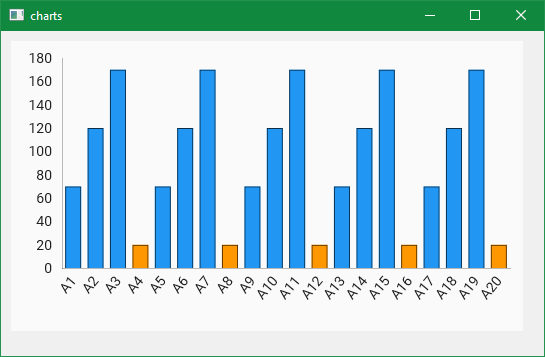
- formandweb.png (10.94 KiB) Viewed 4199 times
and you have more possibilities with the LANSA web controls:
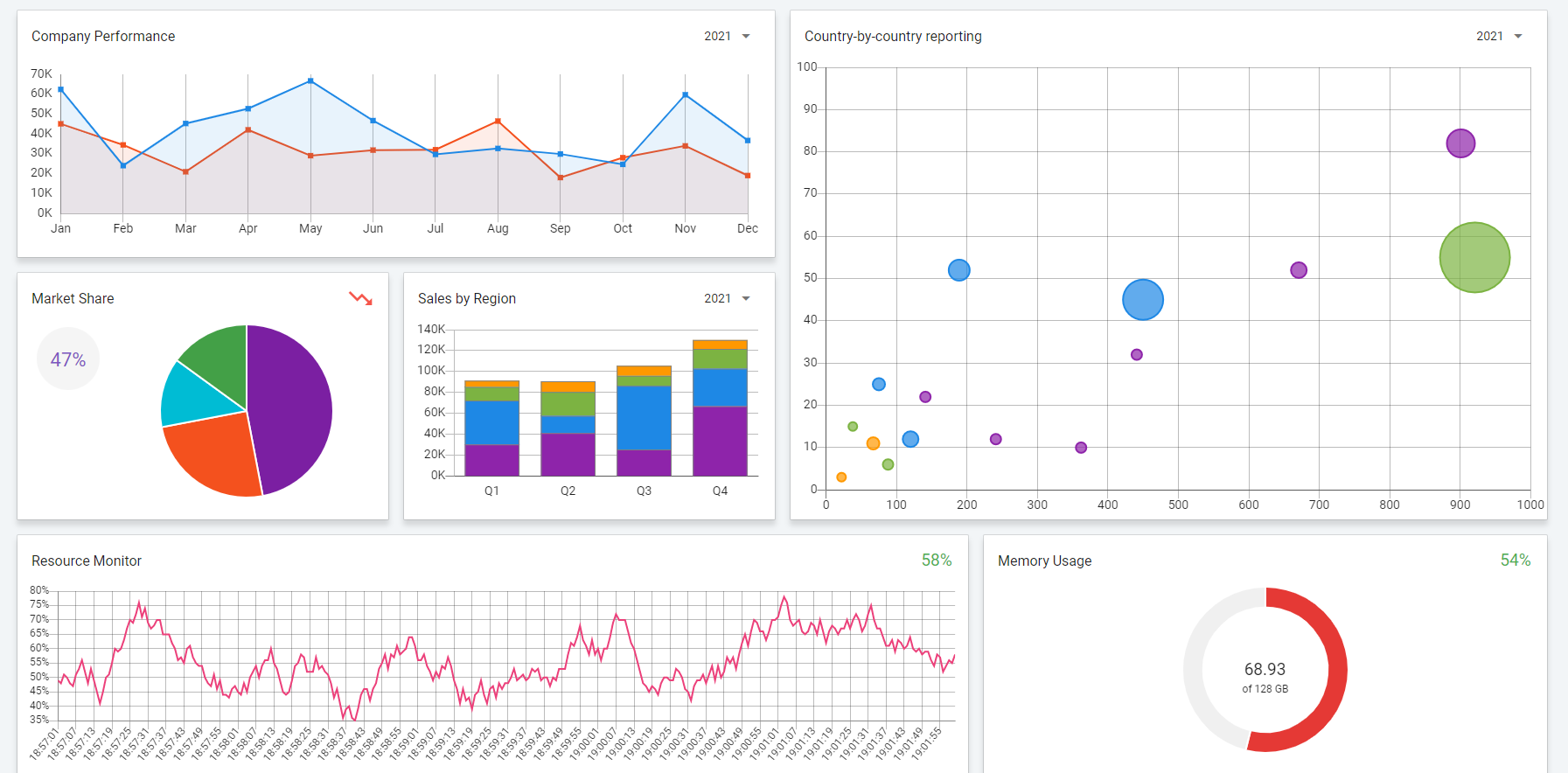
- dashboard.png (143.44 KiB) Viewed 4199 times
other alternatives, will be to expose those charts you like from visual studio in a .net component or an activex
component, enroll it in the LANSA repository and use them from here.
