Page 1 of 1
Platform
Posted: Sat Dec 10, 2022 4:02 am
by Paulm
Hi,
Is there a simple way to get the platform on which a web application runs?
(Windows, Linux, iOS, Android)
Re: Platform
Posted: Sat Dec 10, 2022 5:39 am
by René Houba
Hi Paulm,
I cannot remember a system variable for these, but you can try:
*OSAPI (WIN32 for example for Windows)
Re: Platform
Posted: Sat Dec 10, 2022 6:24 am
by Dino
*OSAPI, here:
https://docs.lansa.com/14/en/lansa015/c ... eneral.htm
*OSAPI
Operating System API Name.
This is a more precise replacement for *CPUTYPE which is less likely to change the name of its values.
Windows Desktop - WIN32 (Note Windows Desktop 64-bit uses WIN32 API)
Windows Metro – WINRT
IBM i – IBMI
Linux - LINUX
Re: Platform
Posted: Mon Dec 12, 2022 9:18 pm
by Paulm
Hi,
*OSAPI is not supported on the Web
Re: Platform
Posted: Tue Dec 13, 2022 12:30 am
by Dino
Hi Paul
If you are in the web, you can find directly what is the browser you are using.
but if you want to know server information, you need to ask the server.
For that, you can create (or add to any server module you are using now) a
server routine like this (in my example here i called test1212 to this server module):
Code: Select all
Begin_Com Role(*EXTENDS #PRIM_SRVM)
Srvroutine Name(GetServerInformation)
Field_Map For(*OUTPUT) Field(#std_strng) Parameter_Name(OSAPI)
#std_strng := *OSAPI
Endroutine
End_Com
then in your webpage:
Code: Select all
Define_Com Class(#test1212.GetServerInformation) Name(#GetServerInformation)
#GetServerInformation.ExecuteAsync OSAPI(#STD_STRNG)
etc.
Re: Platform
Posted: Tue Dec 13, 2022 8:00 am
by adale
So taking the question of what platform a client is running a VL web application from to the next step, I am curious what others might be implementing, or ideas to use.
With the fact our application is VL web, running in a browser.
From the HTTP User Agent string, we can get a good idea of the browser and device OS.
But is there a means to get a more specific device name that we can record as well?
With a remote branch, with several members signing on through the web application, the web IP will all be the ISP assigned to their router connection, so that is really not unique enough (such as LAN ip).
Using a Login ID and pwd, are fine to tell us the "who" and of course we can get the "when", but if there was a more specific "where", that would be helpful. Like the old workstation ID's, it would be great to know that Jim Smith signed in on "Jims iPhone" or "Galaxy Tab A".
I realize the browser is limited, and a simple google search basically confirms a browser on it's own can not pull the computer/device name, but am hopeful someone here might have a good idea to use.
Re: Platform
Posted: Tue Dec 13, 2022 8:43 pm
by Paulm
Dino wrote: Tue Dec 13, 2022 12:30 am
Hi Paul
If you are in the web, you can find directly what is the browser you are using.
but if you want to know server information, you need to ask the server.
Hi Dino,
In fact, I would like to know the platform on which the browser runs (client side)
Re: Platform
Posted: Wed Dec 14, 2022 12:56 am
by Dino
I can see in pages like this one:
https://stackoverflow.com/questions/259 ... he-browser
that you can get some information from the browser,
Code: Select all
navigator["appCodeName"]
navigator["appName"]
navigator["appMinorVersion"]
navigator["cpuClass"]
navigator["platform"]
navigator["plugins"]
navigator["opsProfile"]
navigator["userProfile"]
navigator["systemLanguage"]
navigator["userLanguage"]
navigator["appVersion"]
navigator["userAgent"]
navigator["onLine"]
navigator["cookieEnabled"]
navigator["mimeTypes"]
...using javascript function navigator.
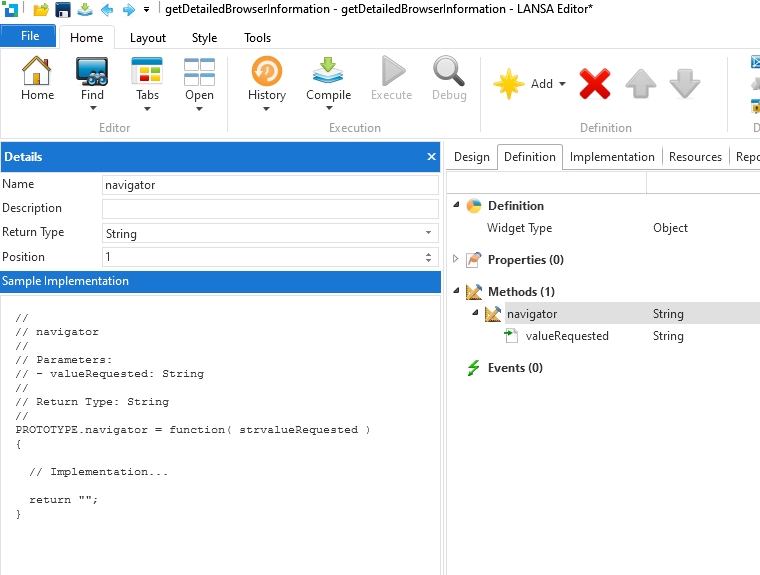
To include javascript in LANSA, one of the possible ways is to use a widget. You can create a new widget
like this:
- widgetnavigator01.jpg (105.24 KiB) Viewed 30946 times
and in the implementation tab use this javascript code:
Code: Select all
function( PROTOTYPE, WIDGET )
{
  PROTOTYPE.navigator = function( strvalueRequested )
  {
    return navigator[strvalueRequested];
  }
  return WIDGET.Completed;
}
then you can include that widget in any LANSA web page you need and use it like this:
Code: Select all
Begin_Com Role(*EXTENDS #PRIM_WEB) Theme(#SYS_THEME<MaterialDesignBlue>)

Define_Com Class(#getDetailedBrowserInformation) Name(#getDetailedBrowserInformation)
Define_Com Class(#PRIM_MD.Label) Name(#Text) Caption('Text') DisplayPosition(1) Left(33) Parent(#COM_OWNER) TabPosition(1) Top(263) Width(968)

Evtroutine Handling(#Com_owner.Initialize)
#Text.Caption := #getDetailedBrowserInformation.navigator( "appCodeName" )
Endroutine

End_Com
By using a widget, if you ever need to update the way you get this browser information, is just one centralized place to do it in the repository, instead of having different code to achieve the same in several programs.
Re: Platform
Posted: Thu Dec 15, 2022 12:33 am
by adale
Has anyone else tried to utilize the js function navigator?
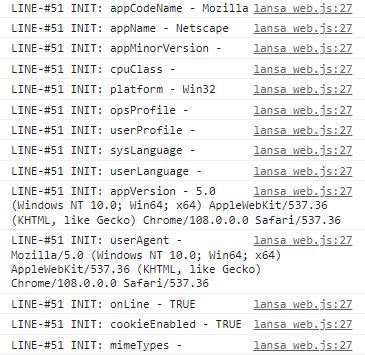
I have followed Dino's example, created the widget, loaded to a VL web view, but only get some of the fields populated?
Values received for:
appCodeName, appName, platform, appVersion, userAgent, onLine, cookieEnabled
Blank, or no values received for:
appMinorVersion, cpuClass, opsProfile, userProfile, systemLanguage, userLanguage, mimeTypes
I am just wondering if I have something incorrect, or should I not expect to get values for those other fields?
- js_navigator.JPG (51.89 KiB) Viewed 30918 times
Re: Platform
Posted: Fri Dec 16, 2022 7:13 pm
by Paulm
Thank you very much Dino, I will try your solution
Re: Platform
Posted: Fri Dec 23, 2022 1:22 am
by Paulm
Hi Dino,
I tried your solution and it is exactly what I needed.
Thank you very much for your help.
Re: Platform
Posted: Fri Dec 23, 2022 11:37 am
by BrendanB
Browsers do not guarantee that *any* of that information is accurate.
In many browsers, it is possible to configure the browser to 'alter' the provided information (ie. the user can change what is exposed).
So it should not be *relied* upon.
I prefer the idea of asking your 'logged in' user to name their device, and storing a Secure Cookie or using Secure Storage to store a value that you generated as an 'ID' (which you can then 'lookup' in a table).
The bigger question would be 'why do you need to know if they are on Windows/Linux/Android/IOS etc.':
If you are using the supplied controls with LANSA, then these *should* work the same regardless of platform.
If you have something specific which you *know* would only be available on a specific device, then follow the advice since 2001 which is to:
*test* for the feature existence. :
Code: Select all
if (window.navigator.msSaveOrOpenBlob)
{
  // do what you need with that feature (typically this would be InternetExplorer specific).
}
else
{
  // do things the way it works in most browsers
}
This avoids coding a specific ' IF InternetExplorer running on windows 8' do something.
Re: Platform
Posted: Sat Dec 24, 2022 5:31 am
by adale
Brendan,
I do not know the exact needs Paulm started this thread for, but I am looking for suggestions and ideas on how others might be logging or tracking what would be the "workstation" name or id, when using VL web client applications. This would be for audit or training purposes to track the "Who, When, and Where" of an action being logged. The Who & When is the easy part, I am looking for a good "Where" option. Is there already an example of what you are describing in your idea with the secure storage (maybe in a technical newsletter)?