Page 1 of 1
VLWeb Validation Errors / Messaging
Posted: Mon Jan 16, 2023 11:05 pm
by mark.civ
Hi,
I am using VLWeb and am simply trying to validate blank input into name fields. Ultimately I want to provide context specific validation messages to the web page.
Q1.
I have a reusable part that shows person details onto a webpage. I have existing fields and table I have to use. The validation rules are located on the table definition and not each specific field definition (not sure if that matters). When I use .validate as shown below, the rules on the table are not being checked. I assume they should be checked but the blank entries is being returned as true - ok.
Code: Select all
#GivenName.Validate Operation(Update) Table(#PERSON) Valid(#Result1)
#FamilyName.Validate Operation(Update) Table(#MRKPER) Valid(#Result2)
Q2.
Having jumped to the server, I perform an update on the table. When I do, validation errors occur and I can see messages being passed back to the reusable part, where I have also passed back the IO$STS.
Code: Select all
"messages":["Family name must not be blank","Given name must not be blank"],"fields":{"IO$STS":{"type":{"t":"A","l":2},"value":"VE"}}
This isn't particularly useful as it does not relate the messages to a specific field. Is there a method of getting hold of the messages and their related fields from(after) the update command? I have looked through Val_Error settings but am not sure how to get at the message generated and the field it relates to?
Re: VLWeb Validation Errors / Messaging
Posted: Tue Jan 17, 2023 4:53 am
by Dino
Hi
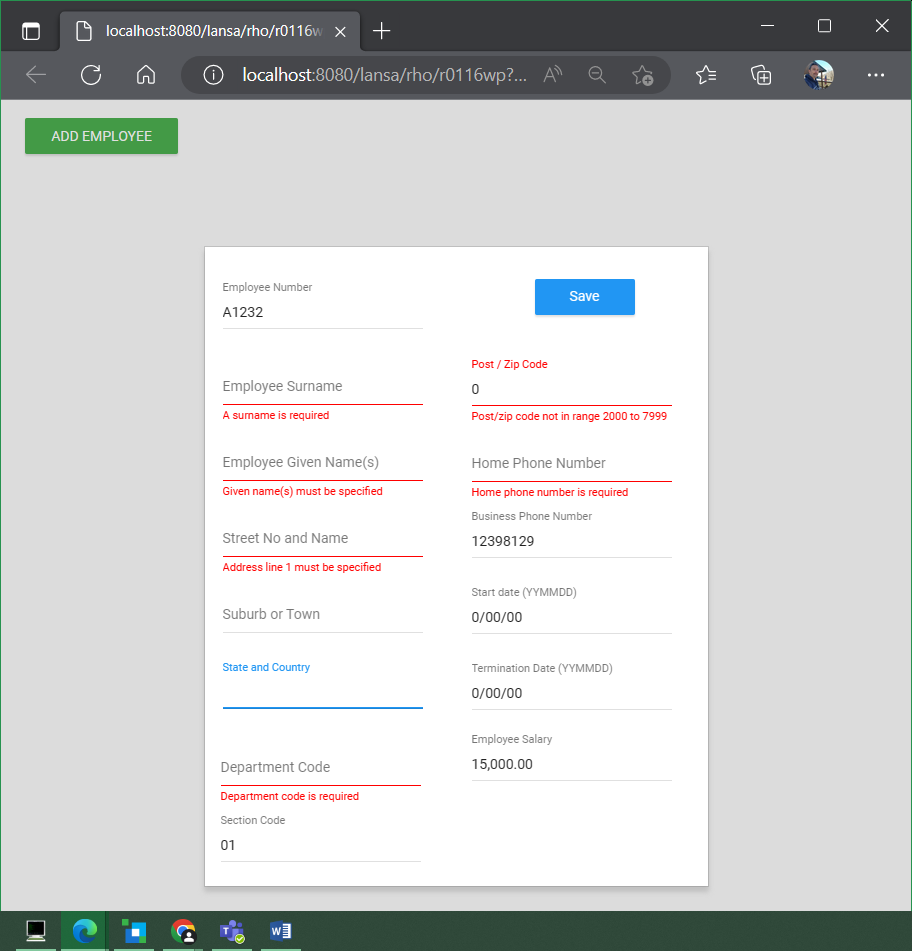
If you use a dialog, all that is handled for you automatically.
For example if you have a web page that uses a dialog:
Code: Select all
Begin_Com Role(*EXTENDS #PRIM_WEB) Theme(#SYS_THEME<MaterialDesignBlue>) Height(560) Width(840)

Define_Com Class(#PRIM_MD.RaisedButton) Name(#Button) Caption('ADD EMPLOYEE') DisplayPosition(1) Left(24) Parent(#COM_OWNER) TabPosition(1) ThemeDrawStyle('MediumSuccess') Top(18) Width(153)
Define_Com Class(#R0116DL) Name(#R0116DL)

Evtroutine Handling(#Button.Click)
#R0116DL.Show
Endroutine
End_Com
and the code for your dialog is:
Code: Select all
Begin_Com Role(*EXTENDS #PRIM_DLG) Height(641) Width(505)

Define_Com Class(#PRIM_MD.RaisedButton) Name(#Button) Caption('Save') DisplayPosition(1) Left(288) Parent(#COM_OWNER) TabPosition(1) ThemeDrawStyle('MediumTitle') Top(56)
Define_Com Class(#EMPNO.EditField) Name(#EMPNO) DisplayPosition(2) Left(16) Parent(#COM_OWNER) TabPosition(2) Top(17)
Define_Com Class(#SURNAME.EditField) Name(#SURNAME) DisplayPosition(3) Left(16) Parent(#COM_OWNER) TabPosition(3) Top(93)
Define_Com Class(#GIVENAME.EditField) Name(#GIVENAME) DisplayPosition(4) Left(16) Parent(#COM_OWNER) TabPosition(4) Top(169)
Define_Com Class(#ADDRESS1.EditField) Name(#ADDRESS1) DisplayPosition(5) Left(16) Parent(#COM_OWNER) TabPosition(5) Top(245)
Define_Com Class(#ADDRESS2.EditField) Name(#ADDRESS2) DisplayPosition(6) Left(16) Parent(#COM_OWNER) TabPosition(6) Top(321)
Define_Com Class(#ADDRESS3.EditField) Name(#ADDRESS3) DisplayPosition(7) Left(16) Parent(#COM_OWNER) TabPosition(7) Top(397)
Define_Com Class(#POSTCODE.EditField) Name(#POSTCODE) DisplayPosition(8) Left(16) Parent(#COM_OWNER) TabPosition(8) Top(473)
Define_Com Class(#SALARY.EditField) Name(#SALARY) DisplayPosition(9) Left(16) Parent(#COM_OWNER) TabPosition(9) Top(549)
Define_Com Class(#PHONEHME.EditField) Name(#PHONEHME) DisplayPosition(10) Left(249) Parent(#COM_OWNER) TabPosition(10) Top(159)
Define_Com Class(#PHONEBUS.EditField) Name(#PHONEBUS) DisplayPosition(11) Left(249) Parent(#COM_OWNER) TabPosition(11) Top(235)
Define_Com Class(#STARTDTER.EditField) Name(#STARTDTER) DisplayPosition(12) Left(249) Parent(#COM_OWNER) TabPosition(12) Top(311)
Define_Com Class(#TERMDATER.EditField) Name(#TERMDATER) DisplayPosition(13) Left(249) Parent(#COM_OWNER) TabPosition(13) Top(387)
Define_Com Class(#DEPTMENT.EditField) Name(#DEPTMENT) DisplayPosition(14) Left(249) Parent(#COM_OWNER) TabPosition(14) Top(463)
Define_Com Class(#SECTION.EditField) Name(#SECTION) DisplayPosition(15) Left(249) Parent(#COM_OWNER) TabPosition(15) Top(539)

Group_By Name(#PSLMST) Fields(#EMPNO #SURNAME #GIVENAME #ADDRESS1 #ADDRESS2 #ADDRESS3 #POSTCODE #PHONEHME #PHONEBUS #DEPTMENT #SECTION #SALARY #STARTDTE #TERMDATE)

Evtroutine Handling(#Button.Click)
#COM_OWNER.ValidateEmployee
Endroutine

Mthroutine Name(ValidateEmployee)
If (#COM_OWNER.Validate( Update #PSLMST ))
#COM_OWNER.Save
Endif
Endroutine

Mthroutine Name(Save)
Define_Com Class(#PSLMSTSM.Save) Name(#SaveEmployee)
#SaveEmployee.ExecuteAsync PSLMST(#PSLMST) Status(#IO$STS)
Evtroutine Handling(#SaveEmployee.Completed)
If (#IO$STS = "OK")
* Signal Event(EmployeeSaved)
#COM_OWNER.Close
Else
#VF_ELTXTX := ""
For Each(#mensaje) In(#SYS_MSGQ.Messages)
#VF_ELTXTX += #mensaje.Text + (10).AsUnicodeString
Endfor
#sys_web.Alert Caption(#VF_ELTXTX)
Endif
Endroutine
Endroutine
End_Com
You will see it will highlight the fields with error in the screen with no additional interaction needed.
The Alert I put at the end is in the case the server module have additional validation (for example in
a begincheck/endcheck or particular stuff or other kind of errors like duplicated key)
- validate01.png (77.05 KiB) Viewed 4823 times