Page 1 of 1
VLF_One and width on command tabs
Posted: Tue Apr 18, 2023 8:28 pm
by kno_dk
Hi.
is it possible to change the width of the tab of an command - I have a application where I have 12 command tabs and they can not all be see so there will be a 3-dot menu (kebab) to the right.
As you can see in the image below there are space that can be deleted so I will get more space to show more tabs.

- vlf_one.PNG (4.26 KiB) Viewed 9828 times
or is it possible to have 2 rows of tabs?
/klaus
Re: VLF_One and width on command tabs
Posted: Wed Apr 19, 2023 9:34 am
by Dino
There is one solution for that in the documentation. You can create your own reusable part to handle this and make anything in that toolbar area:
https://docs.lansa.com/15/en/LANSA048/i ... 8_8530.htm
for example if you create a reusable part like this (make it platform web):
Code: Select all
Begin_Com Role(*EXTENDS #vf_ac039O) Width(329) Height(65) LayoutManager(#Layout1)

Define_Com Class(#PRIM_TBLO) Name(#Layout1) MarginTop(5) MarginBottom(5)
Define_Com Class(#PRIM_TBLO.Row) Name(#Layout1Row1) DisplayPosition(1) Parent(#Layout1)
Define_Com Class(#PRIM_TBLO.Column) Name(#Layout1Column1) DisplayPosition(1) Parent(#Layout1)
Define_Com Class(#PRIM_TBLO.Item) Name(#Layout1Item1) Alignment(TopCenter) Column(#Layout1Column1) Flow(CenterHorizontal) Manage(#Button1) Parent(#Layout1) Row(#Layout1Row1) Sizing(ContentWidth) MarginLeft(5) MarginRight(5)
Define_Com Class(#PRIM_TBLO.Item) Name(#Layout1Item2) Alignment(TopCenter) Column(#Layout1Column1) Flow(CenterHorizontal) Manage(#Button2) Parent(#Layout1) Row(#Layout1Row1) Sizing(ContentWidth) MarginLeft(5) MarginRight(5)
Define_Com Class(#PRIM_TBLO.Item) Name(#Layout1Item3) Alignment(TopCenter) Column(#Layout1Column1) Flow(CenterHorizontal) Manage(#Button3) Parent(#Layout1) Row(#Layout1Row1) Sizing(ContentWidth) MarginLeft(5) MarginRight(5)
Define_Com Class(#PRIM_TBLO.Item) Name(#Layout1Item4) Alignment(TopCenter) Column(#Layout1Column1) Flow(CenterHorizontal) Manage(#Button4) Parent(#Layout1) Row(#Layout1Row1) Sizing(ContentWidth) MarginLeft(5) MarginRight(5)
Define_Com Class(#PRIM_TBLO.Item) Name(#Layout1Item5) Alignment(TopCenter) Column(#Layout1Column1) Flow(CenterHorizontal) Manage(#Button5) Parent(#Layout1) Row(#Layout1Row1) Sizing(ContentWidth) MarginLeft(5) MarginRight(5)
Define_Com Class(#PRIM_TBLO.Item) Name(#Layout1Item6) Alignment(TopCenter) Column(#Layout1Column1) Flow(CenterHorizontal) Manage(#Button6) Parent(#Layout1) Row(#Layout1Row1) Sizing(ContentWidth) MarginLeft(5) MarginRight(5)
Define_Com Class(#PRIM_TBLO.Item) Name(#Layout1Item7) Alignment(TopCenter) Column(#Layout1Column1) Flow(CenterHorizontal) Manage(#Button7) Parent(#Layout1) Row(#Layout1Row1) Sizing(ContentWidth) MarginLeft(5) MarginRight(5)
Define_Com Class(#PRIM_TBLO.Item) Name(#Layout1Item8) Alignment(TopCenter) Column(#Layout1Column1) Flow(CenterHorizontal) Manage(#Button8) Parent(#Layout1) Row(#Layout1Row1) Sizing(ContentWidth) MarginLeft(5) MarginRight(5)
Define_Com Class(#PRIM_TBLO.Item) Name(#Layout1Item9) Alignment(TopCenter) Column(#Layout1Column1) Flow(CenterHorizontal) Manage(#Button) Parent(#Layout1) Row(#Layout1Row1) Sizing(ContentWidth) MarginLeft(5) MarginRight(5)

Define_Com Class(#PRIM_MD.RaisedButton) Name(#Button) Caption('A') Icon('accessibility') DisplayPosition(9) Parent(#COM_OWNER) TabPosition(9) Top(5) Width(38) Height(30) ThemeDrawStyle('MediumAccent+Rounded') Left(362)
Define_Com Class(#PRIM_MD.RaisedButton) Name(#Button1) Caption('BB') Icon('accessibility') DisplayPosition(8) Left(306) Parent(#COM_OWNER) TabPosition(8) Top(5) Width(46) Height(30) ThemeDrawStyle('MediumTitle+Rounded')
Define_Com Class(#PRIM_MD.RaisedButton) Name(#Button2) Caption('CC') Icon('accessibility') DisplayPosition(7) Left(249) Parent(#COM_OWNER) TabPosition(7) Top(5) Width(47) Height(30) ThemeDrawStyle('MediumAccent+Rounded')
Define_Com Class(#PRIM_MD.RaisedButton) Name(#Button3) Caption('DDDD') Icon('accessibility') DisplayPosition(6) Left(174) Parent(#COM_OWNER) TabPosition(6) Top(5) Width(65) Height(30) ThemeDrawStyle('LightAccent+Rounded')
Define_Com Class(#PRIM_MD.RaisedButton) Name(#Button4) Caption('EEE') Icon('arrow_circle_down') DisplayPosition(5) Left(112) Parent(#COM_OWNER) TabPosition(5) Top(5) Width(52) Height(30) ThemeDrawStyle('Rounded+LightTitle')
Define_Com Class(#PRIM_MD.RaisedButton) Name(#Button5) Caption('F') Icon('ads_click') DisplayPosition(4) Left(66) Parent(#COM_OWNER) TabPosition(4) Top(5) Width(36) Height(30) ThemeDrawStyle('MediumAccent+Rounded')
Define_Com Class(#PRIM_MD.RaisedButton) Name(#Button6) Caption('G') Icon('api') DisplayPosition(3) Left(18) Parent(#COM_OWNER) TabPosition(3) Top(5) Width(38) Height(30) ThemeDrawStyle('Rounded+MediumTitle')
Define_Com Class(#PRIM_MD.RaisedButton) Name(#Button7) Caption('H') Icon('add_task') DisplayPosition(2) Left(-30) Parent(#COM_OWNER) TabPosition(2) Top(5) Width(38) Height(30) ThemeDrawStyle('MediumAccent+Rounded')
Define_Com Class(#PRIM_MD.RaisedButton) Name(#Button8) Caption('I') Icon('accessibility') DisplayPosition(1) Left(-72) Parent(#COM_OWNER) TabPosition(1) Top(5) Width(32) Height(30) ThemeDrawStyle('MediumAccent+Rounded')

Mthroutine Name(uInitialize) Options(*REDEFINE)
#UseAttachment := "CENTER"
Endroutine

Evtroutine Handling(#Button.Click)
#SYS_WEB.Alert Caption('Big button was clicked.')
Endroutine
End_Com
and add this to the Instance List section of your Object definition:
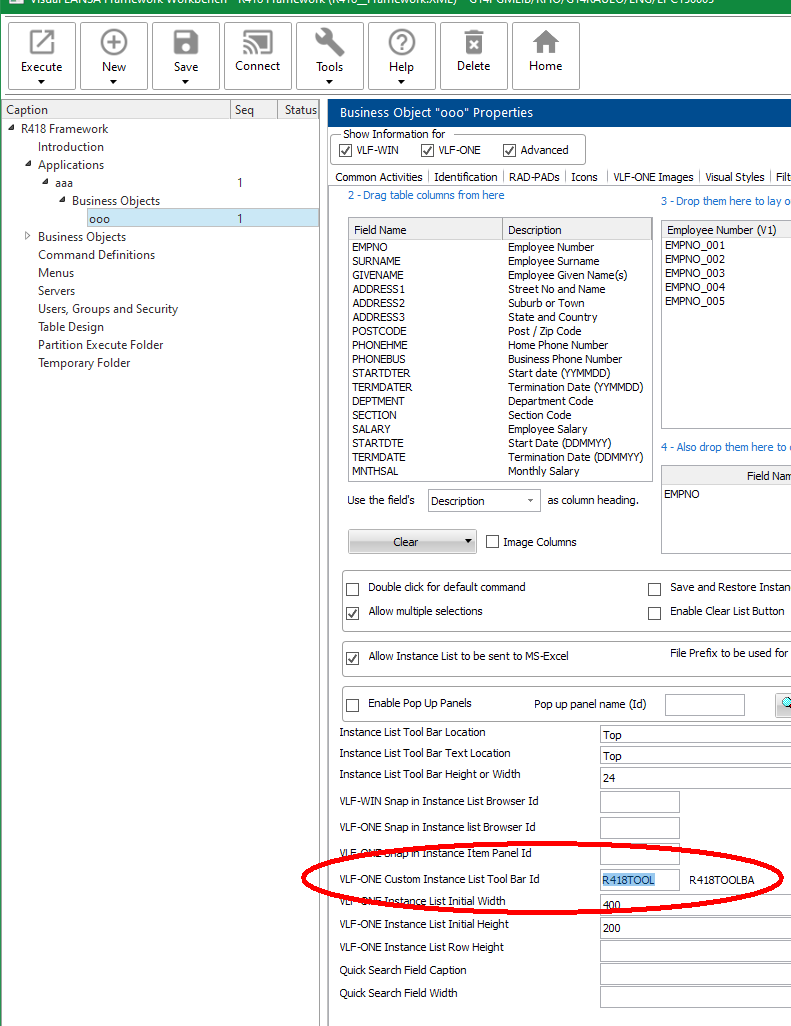
- r418x.png (85.63 KiB) Viewed 9818 times
you can get this:
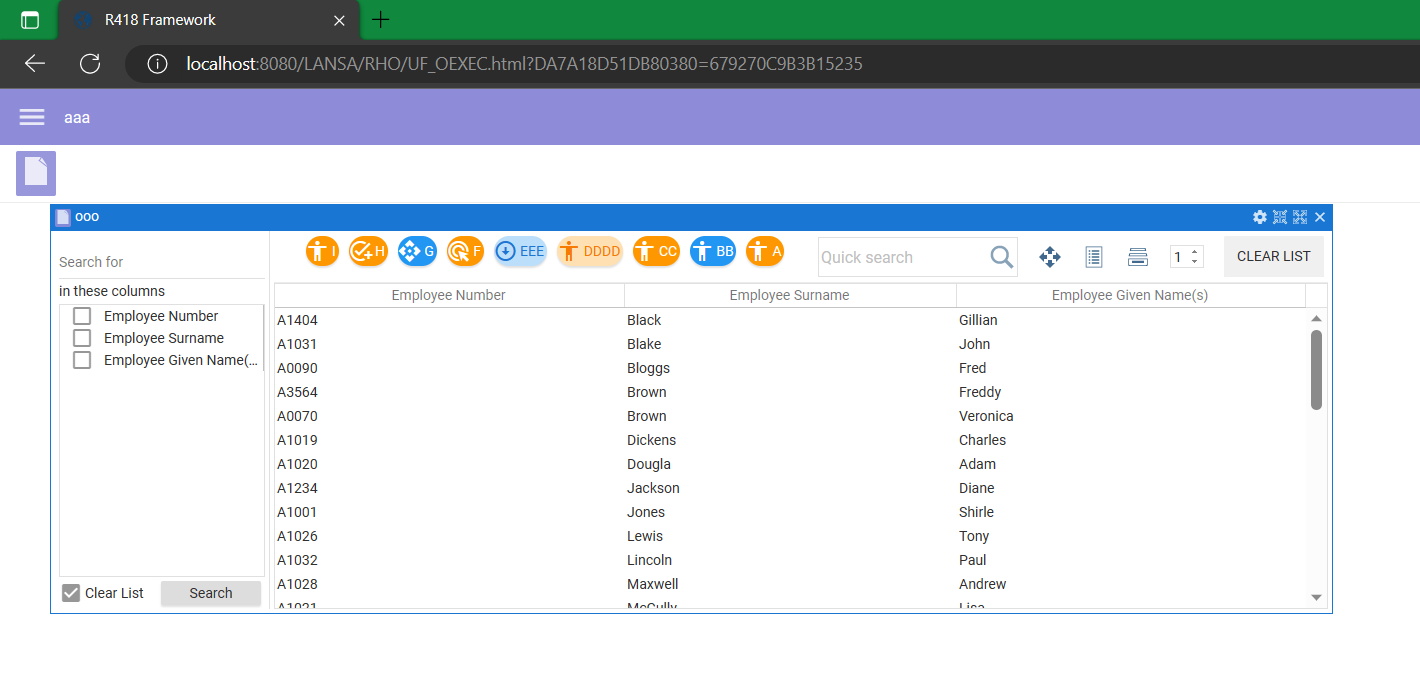
- r418.png (68.22 KiB) Viewed 9818 times
Re: VLF_One and width on command tabs
Posted: Wed Apr 19, 2023 5:04 pm
by kno_dk
Hi
I was not clear in my question. It is not in the instance list i want to change the width, it is in the window with the command handlers :

- vlf_one1.PNG (17.19 KiB) Viewed 9806 times
/klaus
Re: VLF_One and width on command tabs
Posted: Wed Apr 19, 2023 11:40 pm
by Dino
Hi Klaus
I would think an attribute to control the maximum of commands to show in the tab section would be in the Command Display, but I don't see any. Seems that the maximum is a hard 8. Don't matter if you extend the screen to 3 monitors, still only 8 will be show proportionally at the time. If nobody replies with an alternative for this, you should open a case with LANSA suggesting an enhancement.
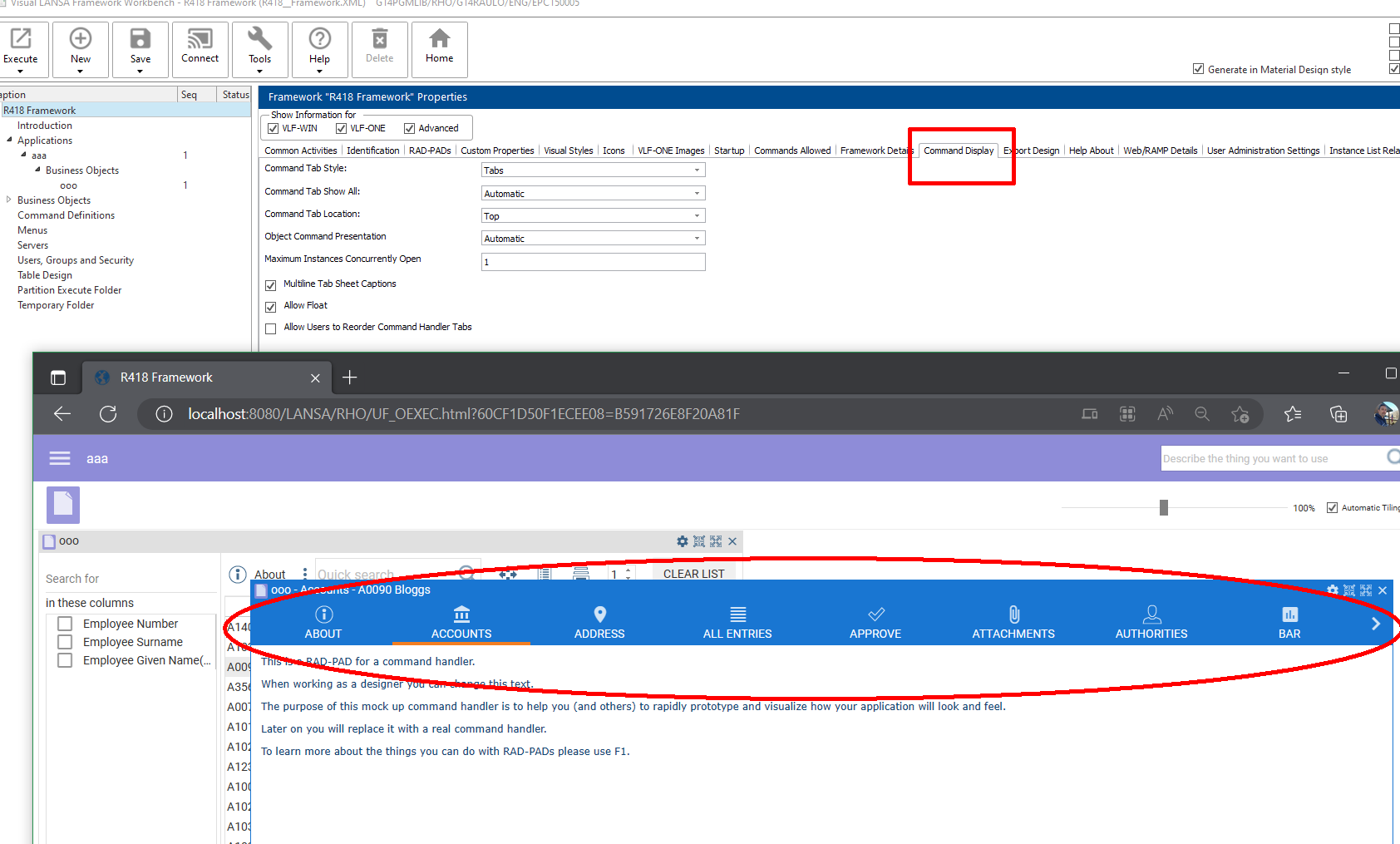
- r418ctabs.png (124.4 KiB) Viewed 9802 times