Page 1 of 1
Unexpected token '<'
Posted: Wed May 17, 2023 5:22 am
by adale
Grasping for a little help here.
VL Web - V15, epc 150050.
I have a widget that connects to and sends data to a network printer (built by a different developer).
The widget functions and works when implemented in a VL Web Page.
But, when I try to implement the widget in a VL web View, it crashes. The view crashes with this error:
JavaScript Syntax Error:
Unexpected token '<'
I have reviewed the widget and don't see any extra or erroneous '<' characters.
I don't quite understand why the widget works in a Web page, but not a web View?
* Note: If I comment out the references to the widget, then the View will load without error.
Searching on this error, the closest reference I found is that the javascript (in the widget) is expected a response in json format, but might be initially receiving a bit of html instead? If this is true, is there something "under the cover" in VL that the VL Web Page intercepts or accepts the html response first before the json response the javascript is expected, that the VL web View does not?
Any guidance is appreciated.
Re: Unexpected token '<'
Posted: Thu May 18, 2023 11:16 am
by Dino
Hi Arlyn
hard to say without knowing what the widget does.
the minimum webpage will have a lot of html/javascript on it, same as a view called by a webpage.
if your widget is maybe opening a window with some json data and sending that to the printer, it should work the same in both cases.
if you could simplify it and send the example...
another alternative, use developer tools from the browser, to see the source generated and check if any difference or code inserted there.
Re: Unexpected token '<'
Posted: Thu May 18, 2023 12:32 pm
by Tim McEntee
Hi Arlyn
Look on the console log for the error. It will tell you the line number in the widget js file where the error occurred. You should be able to click a link which opens the source in developer tools Sources tab. If not find the source file in the sources tab and scroll down to the line number indicated.
You can also hit debug points in the developer tools source and rerun the code. Stepping through and looking at the values before the error occurs might help.
Tim
Re: Unexpected token '<'
Posted: Fri May 19, 2023 4:38 am
by adale
I am not javascript proficient, so I am at a bit of a disadvantage when trying to flush this issue out.
What confuses me, is that the same code works when run as a VL web Page, but not when run as a VL web View?
I will put copies of the page and view sources below.
Trying to find some insight in the browser developer tools isn't showing what I would expect, or I am just not looking in the right area.
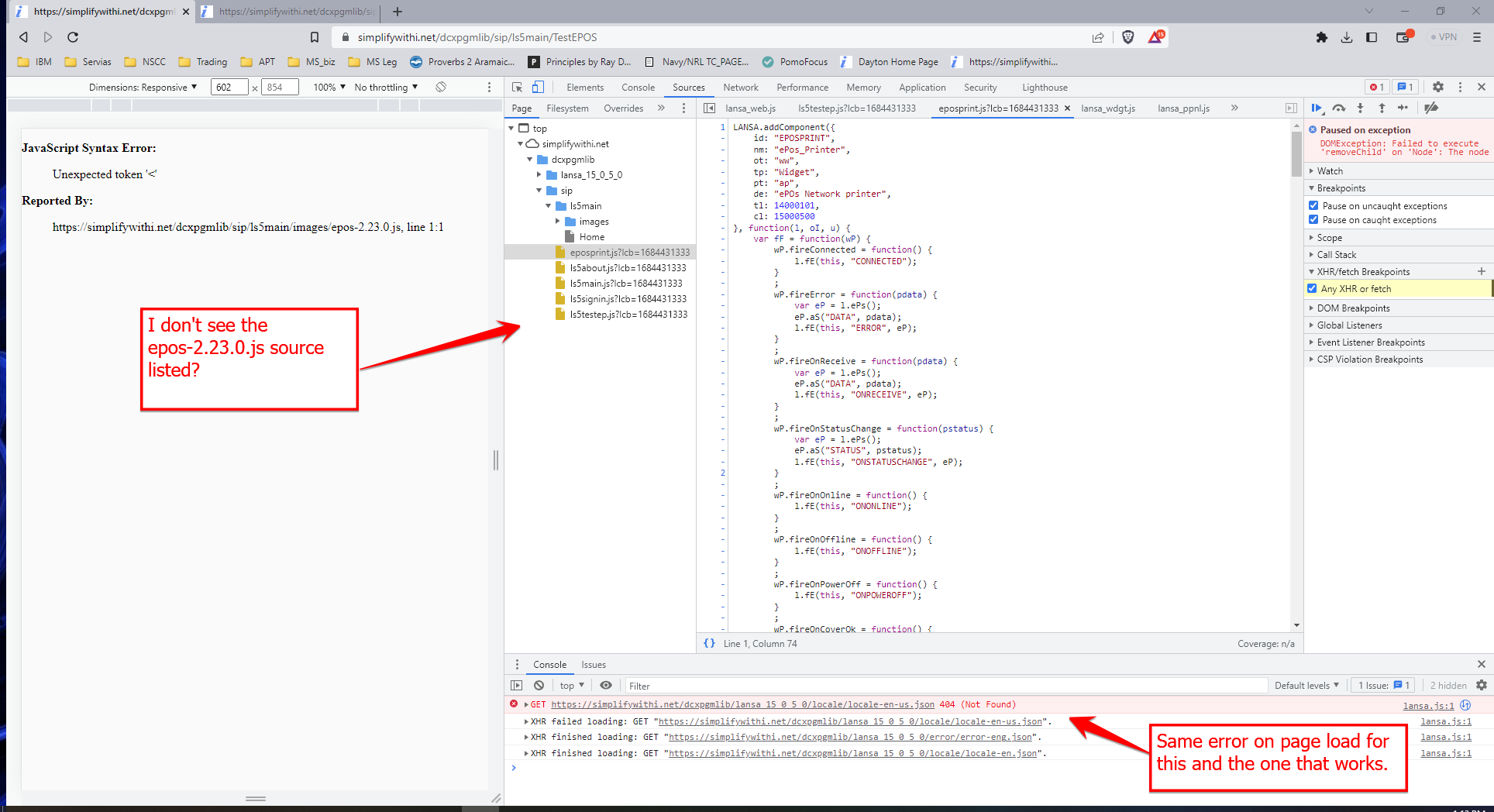
There is the XHR error with the locale-en-us.json 404 not found in both cases, the VL web page that runs, and the exact same on the VL web View that crashes.
When the view crashes, I was kind of expecting to see the referenced js file in the page source listings?
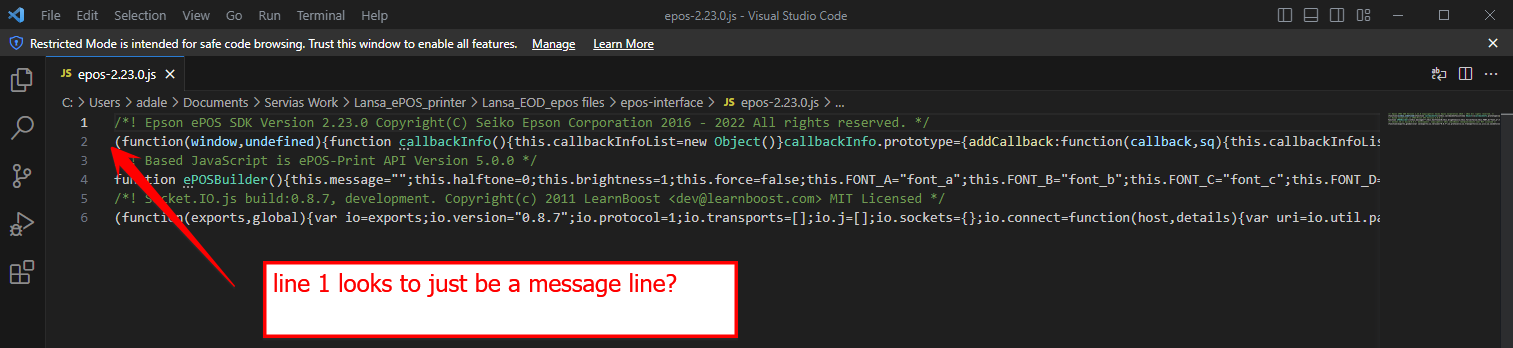
I opened the referenced file (epos-2.23.0.js) in VS code, and line 1 looks only to be a message line?
- epos_debug.png (207.97 KiB) Viewed 10360 times
- epos2230_source.png (69.35 KiB) Viewed 10360 times
VL source for the VL Web Page that works:
Code: Select all
BEGIN_COM Role(*EXTENDS #PRIM_WEB) Theme(#SYS_THEME<MaterialDesignBlue>)

DEFINE_COM Class(#PRIM_MD.RaisedButton) Name(#Button) Caption('SUBMIT') Displayposition(1) Left(30) Parent(#COM_OWNER) Tabposition(1) Themedrawstyle('MediumTitle') Top(69)


DEFINE_COM Class(#ePos_Printer) Name(#ePos_Printer)


* EVTROUTINE Handling(#Com_owner.Initialize)
*
*
* ENDROUTINE


EVTROUTINE Handling(#Button.Click)

DEFINE Field(#ip) Type(*String)
DEFINE Field(#port) Type(*Int)
DEFINE Field(#device) Type(*String)


* This will need to built out to pull values from company specific printer file B0PRTF
#ip := '192.168.8.48'
* Port info: http = 8008, https = 8043
#port := 8043
#device := 'network_printer_0001'

* #ePos_Printer.connect( 127.000.000.001 8008 "PRINTER_1" )
* #ePos_Printer.connect( 127.0.0.1 8008 "local_printer" )
* #ePos_Printer.connect( 192.168.8.48 8008 "network_printer_0001" )

#ePos_Printer.connect( #ip #port #device )


ENDROUTINE


EVTROUTINE Handling(#ePos_Printer.Error) Data(#data)
#sys_web.Console.Log( ("SYSTEM MESSAGE : " + #data) )
ENDROUTINE


EVTROUTINE Handling(#ePos_Printer.Connected)
#sys_web.Console.Log( "Printer connected" )

#COM_OWNER.HelloWorld

ENDROUTINE


MTHROUTINE Name(HelloWorld)
#ePos_Printer.addTextAlign( "ALIGN_CENTER" )
#ePos_Printer.addText( 'Hello World ePOS\n' )
#ePos_Printer.addFeedLine Lines(10)
#ePos_Printer.addCut Cut('CUT_FEED')
#ePos_Printer.send( True )
#COM_OWNER.Disconnect
ENDROUTINE


MTHROUTINE Name(Disconnect)
#ePos_Printer.disconnect
#sys_web.Console.Log( "Printer disconnected" )

ENDROUTINE


END_COM
Source code for VL web View that crashes:
Code: Select all
BEGIN_COM Role(*EXTENDS #PRIM_VIEW) Displayposition(1) Tabposition(1) Layoutmanager(#Layout1) Caption('TestEPOS')
* PLACEHOLDER
DEFINE_COM Class(#PRIM_TBLO) Name(#Layout1)
DEFINE_COM Class(#PRIM_TBLO.Row) Name(#Layout1Row1) Displayposition(1) Parent(#Layout1)
DEFINE_COM Class(#PRIM_TBLO.Column) Name(#Layout1Column1) Displayposition(1) Parent(#Layout1)
DEFINE_COM Class(#PRIM_TBLO.Item) Name(#Layout1Item1) Column(#Layout1Column1) Manage(#Label) Parent(#Layout1) Row(#Layout1Row1) Sizing(ContentWidthAndHeight)

DEFINE_COM Class(#PRIM_MD.Label) Name(#Label) Caption('TestEPOS in View') Displayposition(1) Height(51) Iconheight(0) Left(52) Parent(#COM_OWNER) Tabposition(1) Top(200) Width(197) Captionalignment(Center) Themedrawstyle('Heading1') Paddingbottom(10) Paddingleft(10) Paddingright(10) Paddingtop(10)

DEFINE_COM Class(#PRIM_MD.RaisedButton) Name(#Button) Caption('PRINT') Displayposition(2) Left(48) Parent(#COM_OWNER) Tabposition(2) Themedrawstyle('MediumTitle') Top(48)

* printer widget
DEFINE_COM Class(#ePos_Printer) Name(#ePos_Printer)


* EVTROUTINE Handling(#Com_owner.Initialize)
* * not needed as best I can tell
* ENDROUTINE


EVTROUTINE Handling(#Button.Click)

DEFINE Field(#ip) Type(*String)
DEFINE Field(#port) Type(*Int)
DEFINE Field(#device) Type(*String)


* This will need to built out to pull values from company specific file B0PRTF
#ip := '192.168.8.48'
* Port info: http = 8008, https = 8043
#port := 8043
#device := 'network_printer_0001'

* Console - debug
#sys_web.Console.Log( ('LINE-#33 Click: ' + #ip + ' : ' + #port.AsString + ' - ' + #device) )


* #ePos_Printer.connect( 127.000.000.001 8008 "PRINTER_1" )
* #ePos_Printer.connect( 127.0.0.1 8008 "local_printer" )
* #ePos_Printer.connect( 192.168.8.48 8008 "network_printer_0001" )

#ePos_Printer.connect( #ip #port #device )


ENDROUTINE


EVTROUTINE Handling(#ePos_Printer.Error) Data(#data)
#sys_web.Console.Log( ("SYSTEM MESSAGE : " + #data) )
ENDROUTINE


EVTROUTINE Handling(#ePos_Printer.Connected)
#sys_web.Console.Log( "Printer connected" )

#COM_OWNER.HelloWorld

ENDROUTINE


MTHROUTINE Name(HelloWorld)
#ePos_Printer.addTextAlign( "ALIGN_CENTER" )
#ePos_Printer.addText( 'Hello World ePOS\n' )
#ePos_Printer.addFeedLine Lines(10)
#ePos_Printer.addCut Cut('CUT_FEED')
#ePos_Printer.send( True )
#COM_OWNER.Disconnect
ENDROUTINE


MTHROUTINE Name(Disconnect)
#ePos_Printer.disconnect
#sys_web.Console.Log( "Printer disconnected" )

ENDROUTINE


END_COM
Re: Unexpected token '<'
Posted: Tue May 23, 2023 12:47 am
by adale
Jurgen from Lansa services as able to replicate the issue I was experiencing, and concluded "when using a Widget in View, the handling of external scripts is different compared to when using them in a webpage."
The short fix is that the path to the external scripts have to be fully defined (complete url path, and not just the common /images folder) in the Resources tab of the widget.
This issue has been reported through Lansa support as a bug/defect (995984), and am waiting on their response.