Page 1 of 1
Filepicker in the list
Posted: Wed Jul 12, 2023 2:09 pm
by MegumiSawada
Hi All,
Is there any way to invoke #PRIM_WEB.filepicker to select an image file from each row of the list on the web page?
I have tried to imprement it, but I cannot use filepicker in the list.
What I can think of as a workaround is as follows:
1) put a push button on each rows of list
2) when these buttons are clicked, show pop-up. In the pop-up there is a filepicker (#PRIM_WEB.Filepicker) so you can select an image file
3) Close pop-up and return BLOB value to the list
Is there any better way to use filepicker along with a list to upload BLOB?
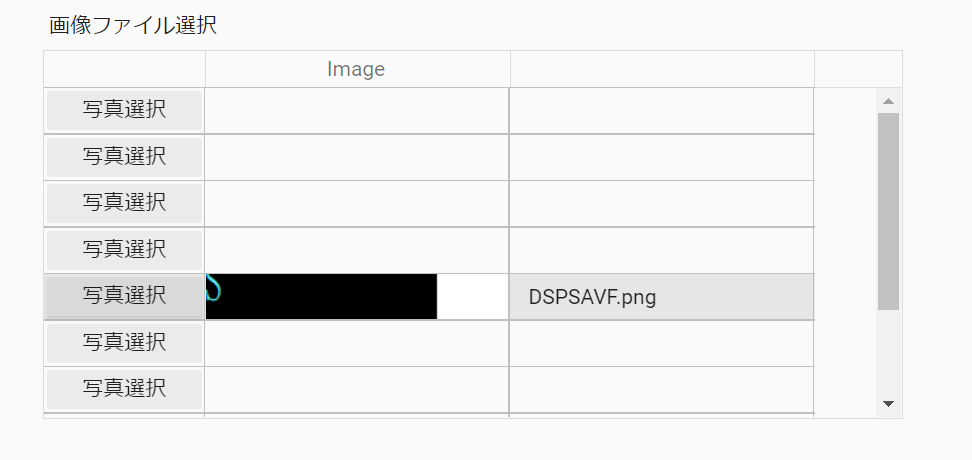
- img1.png (25.48 KiB) Viewed 16594 times
Best Regards,
Megumi Sawada
Re: Filepicker in the list
Posted: Wed Jul 12, 2023 11:10 pm
by Dino
Hi Megumi
My vote is to use tiles. You will have more control over the design and elements on each tile/row.
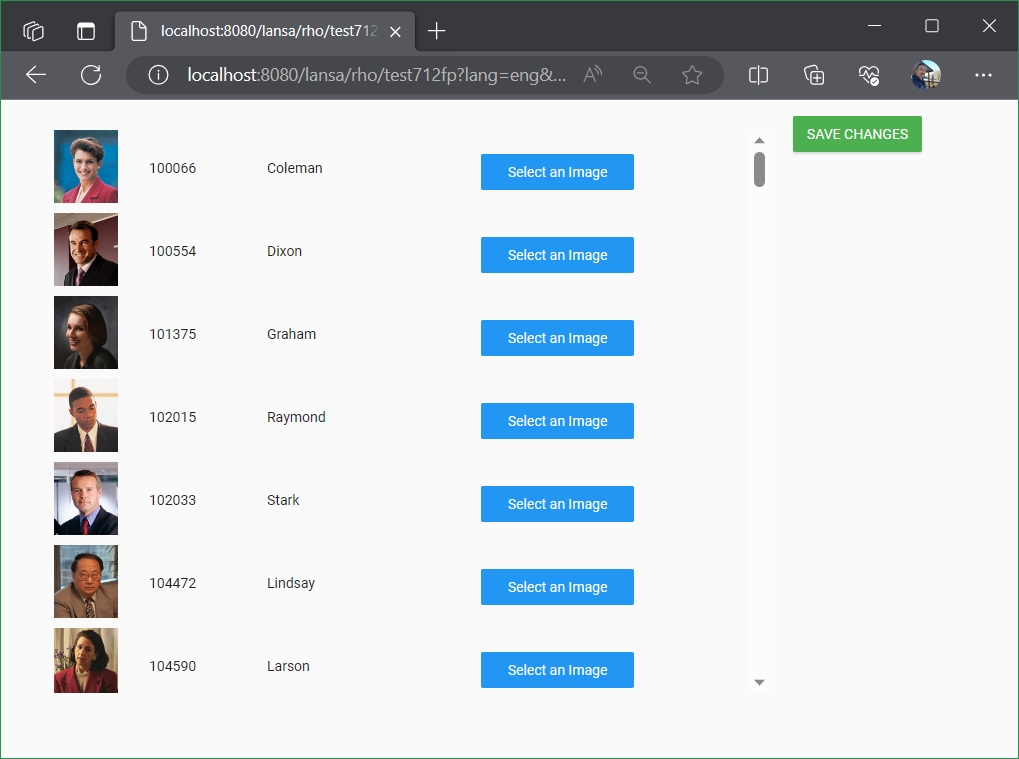
- tileandupload.jpg (145.67 KiB) Viewed 16583 times
so for this, for example a web page like this one:
Code: Select all
Begin_Com Role(*EXTENDS #PRIM_WEB) Theme(#SYS_THEME<MaterialDesignBlue>)

Define_Com Class(#PRIM_TILE<#test712tl>) Name(#Tile1) DisplayPosition(1) Left(40) Parent(#COM_OWNER) TabPosition(1) Top(30) Width(729) Height(563)
Define_Com Class(#PRIM_MD.RaisedButton) Name(#Button) Caption('SAVE CHANGES') DisplayPosition(2) Left(792) Parent(#COM_OWNER) TabPosition(2) ThemeDrawStyle('MediumSuccess') Top(16) Width(129)

Evtroutine Handling(#Com_owner.Initialize)
Define_Com Class(#xEmployeeData.FindAll) Name(#FindAll)
#FindAll.ExecuteAsync xEmployeeList(#Tile1)
Endroutine
Evtroutine Handling(#Button.Click)
Selectlist Named(#Tile1) Where(#STD_FLAG = "Y")
* Save image for #xEmployeeIdentification #xEmployeeImageThumbnail, etc.
Endselect
Endroutine
End_Com
and a tile (reusable part/object) like this:
Code: Select all
Function Options(*DIRECT)
Begin_Com Role(*EXTENDS #PRIM_PANL *implements #Prim_Tile.iTileDesign *ListFields #ListFields) DisplayPosition(1) Height(73) Left(0) TabPosition(1) Top(0) Width(609)

Define_Com Class(#PRIM_IMAG) Name(#ImageinTile) DisplayPosition(1) Image(#xImageImage32) ImageSizing(BestFit) Left(0) Parent(#COM_OWNER) TabPosition(1) TabStop(False) Top(0) Height(73) Width(89)
Define_Com Class(#PRIM_MD.FilePicker) Name(#FilePicker) Caption('Select an Image') DisplayPosition(2) Left(440) Parent(#COM_OWNER) TabPosition(2) ThemeDrawStyle('MediumTitle') Top(24) Width(153)
Define_Com Class(#PRIM_MD.Label) Name(#TextID) Caption('Employee ID') DisplayPosition(3) Left(106) Parent(#COM_OWNER) TabPosition(3) Top(20)
Define_Com Class(#PRIM_MD.Label) Name(#TextSURNAME) Caption('Employee Surname') DisplayPosition(4) Left(224) Parent(#COM_OWNER) TabPosition(4) Top(20) Width(150)

Group_By Name(#ListFields) Fields(#xEmployeeIdentification #xEmployeeSurname #xEmployeeImageThumbnail #STD_FLAG)

Mthroutine Name(OnAdd) Options(*REDEFINE)

#TextID := #xEmployeeIdentification
#TextSURNAME := #xEmployeeSurname
#ImageinTile.Image <= #SYS_APPLN.CreateBitmap( #xEmployeeImageThumbnail )
#STD_FLAG := "N"
Endroutine

Evtroutine Handling(#FilePicker.FileSelected) File(#STD_BLOB)
#xEmployeeImageThumbnail := #STD_BLOB.Blob
#ImageinTile.Image <= #SYS_APPLN.CreateBitmap( #xEmployeeImageThumbnail )
#STD_FLAG := "Y"
Endroutine

End_Com
note that to keep this example simple, I used a flag to let the web page know that an entry has changed.
But if you go full tiles, review the use of references, events, data models, etc. (look in the repository for reusable parts that contain #PRIM_TILE)
Kind regards
Re: Filepicker in the list
Posted: Wed Jul 12, 2023 11:47 pm
by Dino
saying so.... i just remember that in the same way you have tiledesign... you have celldesign. and that reusable parts can be used as part of a list, so you can get to this with a list as well.
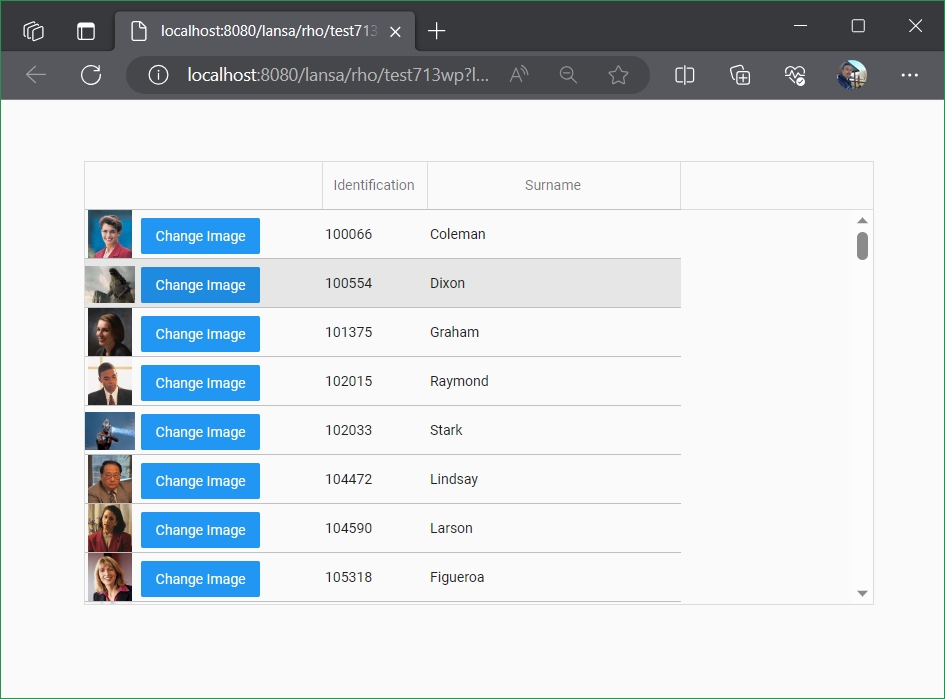
- celldesign.jpg (136.97 KiB) Viewed 16580 times
so a web page like this:
Code: Select all
Begin_Com Role(*EXTENDS #PRIM_WEB) Theme(#SYS_THEME<MaterialDesignBlue>)

Define_Com Class(#PRIM_LIST) Name(#List) ColumnHeaderHeight(48) ColumnLines(False) DisplayPosition(1) Height(444) Left(83) Parent(#COM_OWNER) RowHeight(48) TabPosition(1) Top(61) Width(790)
Define_Com Class(#PRIM_LIST.Part) Name(#ListColumn1) ColumnWidth(235) Design(#test713cd) DisplayPosition(1) Parent(#List)
Define_Com Class(#PRIM_LIST.String) Name(#ListColumn2) ColumnWidth(102) DisplayPosition(2) Parent(#List) SortOnClick(True) Source(#xEmployeeIdentification)
Define_Com Class(#PRIM_LIST.String) Name(#ListColumn3) ColumnWidth(250) DisplayPosition(3) Parent(#List) SortOnClick(True) Source(#xEmployeeSurname)

Evtroutine Handling(#Com_owner.Initialize)
Define_Com Class(#xEmployeeData.FindAll) Name(#FindAll)
#FindAll.ExecuteAsync xEmployeeList(#List)
Endroutine
End_Com
using a reusable part (#test713cd) like this:
Code: Select all
Function Options(*DIRECT)
Begin_Com Role(*EXTENDS #PRIM_PANL *implements #Prim_List.iListCellDesign *ListFields #ListFields) DisplayPosition(1) Height(49) Left(0) TabPosition(1) Top(0) Width(185)

Define_Com Class(#PRIM_IMAG) Name(#ImageInTile) DisplayPosition(1) Image(#xImageImage32) ImageSizing(BestFit) Left(0) Parent(#COM_OWNER) TabPosition(1) TabStop(False) Top(0)
Define_Com Class(#PRIM_MD.FilePicker) Name(#FilePicker) Caption('Change Image') DisplayPosition(2) Left(56) Parent(#COM_OWNER) TabPosition(2) ThemeDrawStyle('MediumTitle') Top(8) Width(119)

Group_By Name(#ListFields) Fields(#xEmployeeImageThumbnail)

Mthroutine Name(OnAdd) Options(*REDEFINE)
#ImageInTile.Image <= #SYS_APPLN.CreateBitmap( #xEmployeeImageThumbnail )
Endroutine

Evtroutine Handling(#FilePicker.FileSelected) File(#STD_BLOB)
#xEmployeeImageThumbnail := #STD_BLOB.Blob
#ImageInTile.Image <= #SYS_APPLN.CreateBitmap( #xEmployeeImageThumbnail )
Endroutine
End_Com
will do the same thing.
Re: Filepicker in the list
Posted: Thu Jul 13, 2023 10:25 am
by MegumiSawada
Hi Dino,
Thank you!!
I'll try these.
Best Regards,
Megumi Sawada
Re: Filepicker in the list
Posted: Wed Jul 19, 2023 11:26 am
by MegumiSawada
Hi,
I have successfully impremented the reusable parts in the list to file pick!
However, I would like to set BLOB value to other field in the list as well.
(I would like to upd_entry the same row of the list which file selected with the BLOB value.)
Is it possible to do so?
I think I should use parameters or properties to do so, but cannot think of how to do it
I appreciate your kind advice.
Best Regards,
Megumi Sawada
Re: Filepicker in the list
Posted: Fri Jul 21, 2023 6:56 am
by Dino
Hi
Something like this? (basically, added a OnUpdate routine in the reusable part, and a button to copy from one field to another)
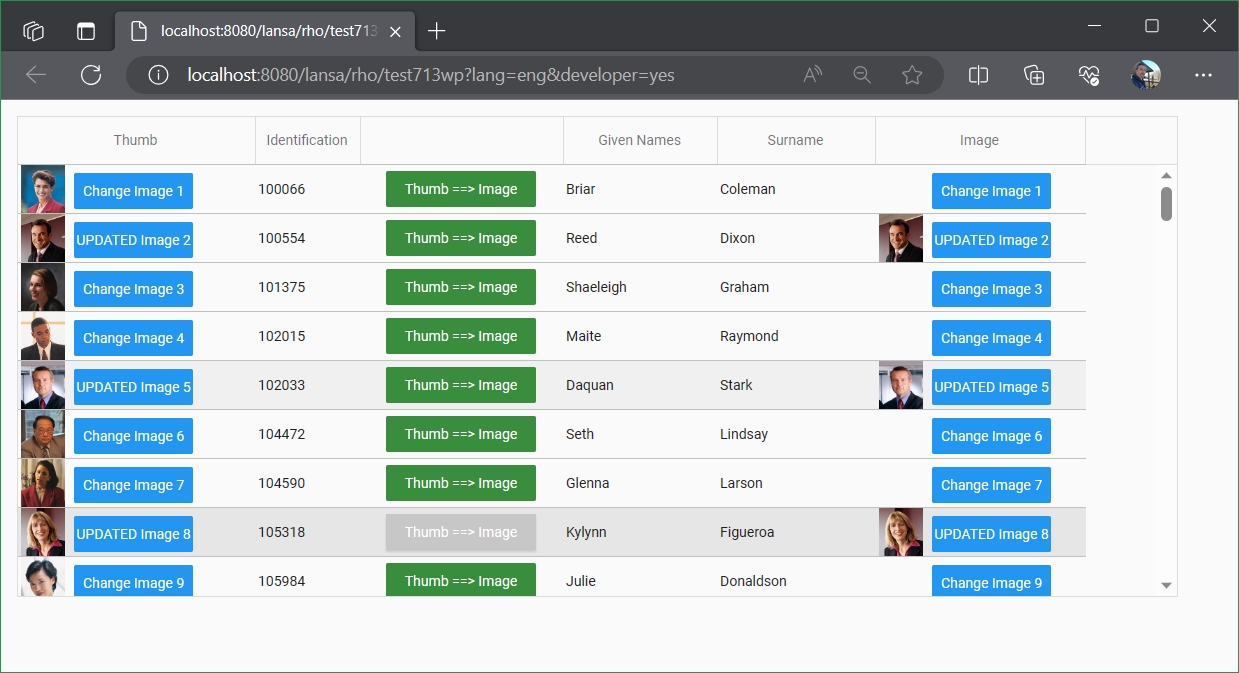
- thumbtoimagecelldesign.jpg (260.56 KiB) Viewed 16446 times
Web Page:
Code: Select all
Begin_Com Role(*EXTENDS #PRIM_WEB) Theme(#SYS_THEME<MaterialDesignBlue>)

Define_Com Class(#PRIM_LIST) Name(#List) ColumnHeaderHeight(48) ColumnLines(False) DisplayPosition(1) Height(481) Left(16) Parent(#COM_OWNER) RowHeight(48) TabPosition(1) Top(16) Width(1161)
Define_Com Class(#PRIM_LIST.Part) Name(#ListColumn1) ColumnWidth(235) Design(#test713cd) DisplayPosition(1) Parent(#List) ColumnCaption('Thumb')

Define_Com Class(#PRIM_LIST.String) Name(#ListColumn3) ColumnWidth(102) DisplayPosition(2) Parent(#List) SortOnClick(True) Source(#xEmployeeIdentification)
Define_Com Class(#PRIM_LIST.String) Name(#ListColumn4) ColumnWidth(155) DisplayPosition(5) Parent(#List) SortOnClick(True) Source(#xEmployeeSurname)
Define_Com Class(#PRIM_LIST.String) Name(#ListColumn5) ColumnWidth(151) DisplayPosition(4) Parent(#List) SortOnClick(True) Source(#xEmployeeGivenNames)
Define_Com Class(#PRIM_LIST.Part) Name(#ListColumn2) ColumnWidth(207) Design(#test713cd2) DisplayPosition(6) Parent(#List) ColumnCaption('Image')
Define_Com Class(#PRIM_LIST.Button) Name(#ListColumn6) Caption('Thumb ==> Image') CellHeight(36) CellSizing(None) CellThemeDrawStyle('DarkSuccess') CellWidth(150) DisplayPosition(3) Parent(#List) ColumnWidth(200)

Evtroutine Handling(#Com_owner.Initialize)
#COM_OWNER.Load
Endroutine
Mthroutine Name(Load)
Define_Com Class(#xEmployeeData.FindAll) Name(#FindAll)
#FindAll.ExecuteAsync xEmployeeList(#List)
Evtroutine Handling(#FindAll.Completed)
Endroutine
Endroutine
Evtroutine Handling(#ListColumn6.Click)
#xEmployeeImage := #xEmployeeImageThumbnail
Upd_Entry
Endroutine
End_Com
changes to the original test713cd reusable part:
Code: Select all
Function Options(*DIRECT)
Begin_Com Role(*EXTENDS #PRIM_PANL *implements #Prim_List.iListCellDesign *ListFields #ListFields) DisplayPosition(1) Height(49) Left(0) TabPosition(1) Top(0) Width(185)

Define_Com Class(#PRIM_IMAG) Name(#ImageInTile) DisplayPosition(1) Image(#xImageImage32) ImageSizing(BestFit) Left(0) Parent(#COM_OWNER) TabPosition(1) TabStop(False) Top(0)
Define_Com Class(#PRIM_MD.FilePicker) Name(#FilePicker) Caption('Change Image') DisplayPosition(2) Left(56) Parent(#COM_OWNER) TabPosition(2) ThemeDrawStyle('MediumTitle') Top(8) Width(119)

Group_By Name(#ListFields) Fields(#xEmployeeImageThumbnail)

Define_Evt Name(ColumnClick)
Define_Map For(*INPUT) Class(#std_num) Name(#Item)

Mthroutine Name(OnAdd) Options(*REDEFINE)
#ImageInTile.Image <= #SYS_APPLN.CreateBitmap( #xEmployeeImageThumbnail )
#FilePicker.Caption := "Change Image " + #ListItem.Entry.AsString
Endroutine

Mthroutine Name(OnUpdate) Options(*REDEFINE)
#ImageInTile.Image <= #SYS_APPLN.CreateBitmap( #xEmployeeImageThumbnail )
#FilePicker.Caption := "UPDATED Image " + #ListItem.Entry.AsString
Endroutine

Evtroutine Handling(#FilePicker.FileSelected) File(#STD_BLOB)
#xEmployeeImageThumbnail := #STD_BLOB.Blob
#ImageInTile.Image <= #SYS_APPLN.CreateBitmap( #xEmployeeImageThumbnail )
Endroutine
End_Com
new reusable part test713cd2 (copy of cd1 basically but using another image, #xEmployeeImage... just note that the server module is not populating that field, so you won't see an image there initially. (if you want that you need to create your own server module to include that field as well).
Code: Select all
Function Options(*DIRECT)
Begin_Com Role(*EXTENDS #PRIM_PANL *implements #Prim_List.iListCellDesign *ListFields #ListFields) DisplayPosition(1) Height(49) Left(0) TabPosition(1) Top(0) Width(185)

Define_Com Class(#PRIM_IMAG) Name(#ImageInTile) DisplayPosition(1) Image(#xImageImage32) ImageSizing(BestFit) Left(0) Parent(#COM_OWNER) TabPosition(1) TabStop(False) Top(0)
Define_Com Class(#PRIM_MD.FilePicker) Name(#FilePicker) Caption('Change Image') DisplayPosition(2) Left(56) Parent(#COM_OWNER) TabPosition(2) ThemeDrawStyle('MediumTitle') Top(8) Width(119)

Group_By Name(#ListFields) Fields(#xEmployeeImage)

Mthroutine Name(OnAdd) Options(*REDEFINE)
#ImageInTile.Image <= #SYS_APPLN.CreateBitmap( #xEmployeeImage )
#FilePicker.Caption := "Change Image " + #ListItem.Entry.AsString
Endroutine
Mthroutine Name(OnUpdate) Options(*REDEFINE)
#ImageInTile.Image <= #SYS_APPLN.CreateBitmap( #xEmployeeImage )
#FilePicker.Caption := "UPDATED Image " + #ListItem.Entry.AsString
Endroutine
Evtroutine Handling(#FilePicker.FileSelected) File(#STD_BLOB)
#xEmployeeImage := #STD_BLOB.Blob
#ImageInTile.Image <= #SYS_APPLN.CreateBitmap( #xEmployeeImage )
Endroutine
End_Com
Re: Filepicker in the list
Posted: Tue Jul 25, 2023 3:53 pm
by MegumiSawada
Hi Dino,
Thank you for your reply.
Based on your advice and sample, I have succeeded in implementing what I desire.
Thank you!
Best Regards,
Megumi Sawada