Page 1 of 1
JIT Applications fail after Lansa version upgrade
Posted: Fri Dec 29, 2023 8:29 am
by trossiter
We have just upgraded our system from v13.2 to v14.2. When launching a deployed application, we get the following error message:
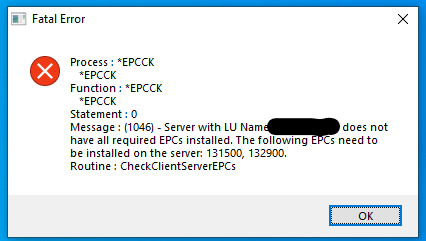
- error_message.png (13.96 KiB) Viewed 43226 times
We are in the process of creating update packages in v14.2 for all of our deployed applications to also point to a new JIT server to avoid version issues we already ran into there since our old JIT server was running on v14.1. Short of manually uninstalling the old application and reinstalling it at the new version, does anybody know how I can get past this error so JIT can proceed to update the program?
Re: JIT Applications fail after Lansa version upgrade
Posted: Wed Jan 03, 2024 9:25 am
by bark
Is the blanked out server in the error message your JIT application server or your backend (IBM I assume) D/A server?
As this is JIT deployment, you shouldn't have to manually uninstall and reinstall a new version as this defeats the purpose of JIT.
We use JIT deployment model in our organization and while I'm not involved in the deployments, I was told that we upgrade our JIT server first before deploying the new packages. This mismatched combination seems to handle the JIT connection OK. Thinking about it, it must have to or else you would never be able to upgrade the clients because of a catch-22 situation. Note, in our environment, we have a full VL installed on the JIT app server with just a superserver license for JIT. So, we apply the EPCS/upgrade to the Visual LANSA installation (rather than having a deployed JIT application that you upgrade via a shipped template package)
The other option is to set up a dedicated testing environment if you don't have one already, that is, test client PC(s) pointing to a test JIT app server and backend server, where you can try things first.
HTH
bark
Re: JIT Applications fail after Lansa version upgrade
Posted: Fri Jan 05, 2024 7:11 am
by trossiter
Hi bark,
Unfortunately, we were up against the clock as the production floor returned from winter break on January 2nd, and we went ahead with the manual uninstall/reinstall to point applications to the new JIT server.
To answer your question, the blacked out server ID is our backend server. Our setup sounds the same as yours with a full VL install on the JIT server. However, the VL that was being used on the JIT server was on version 14.1 while the new application builds were on version 14.2, so there was a client-server mismatch there that the JIT update process didn't like. It would refuse to make the connection to JIT to update applications if the application was built in a newer version of VL than the version of VL that the JIT host was on. So we had to create a new JIT server with a new install of VL at v14.2.
Manually installing the new version built out of the upgraded VL and pointed to the new JIT server seems to have done the trick as new updates placed on the new JIT server are being picked up and applied correctly again. I think the problem boiled down to only upgrading one of the several VL systems in use and upgrading the backend server before getting the new JIT server ready.