Page 1 of 1
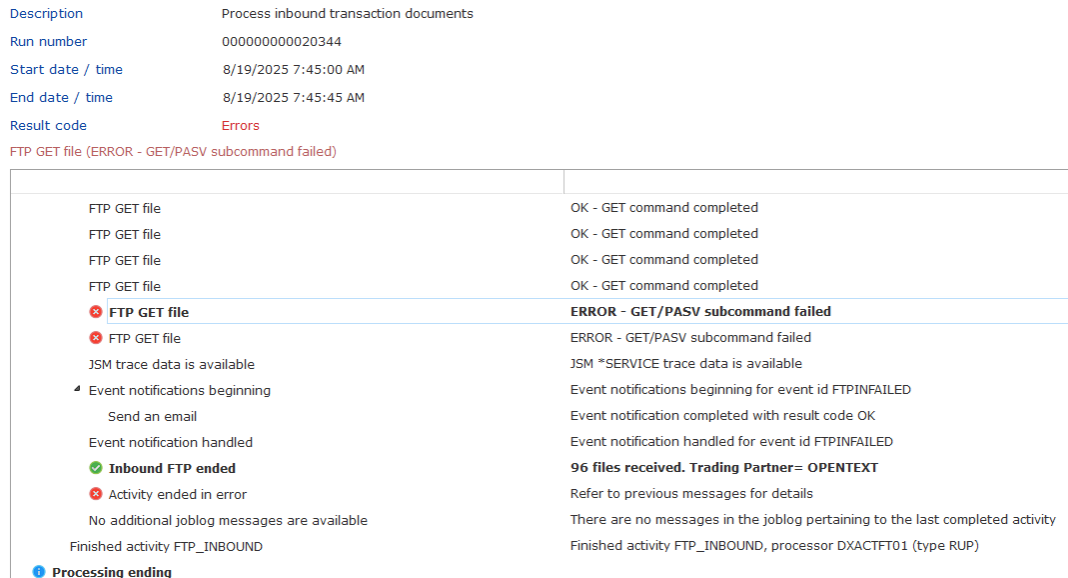
Composer Processing Sequence fails always after 96 FTP GET
Posted: Wed Aug 27, 2025 6:53 pm
by René Houba
A Processing Sequence is doing FTP GET of files.
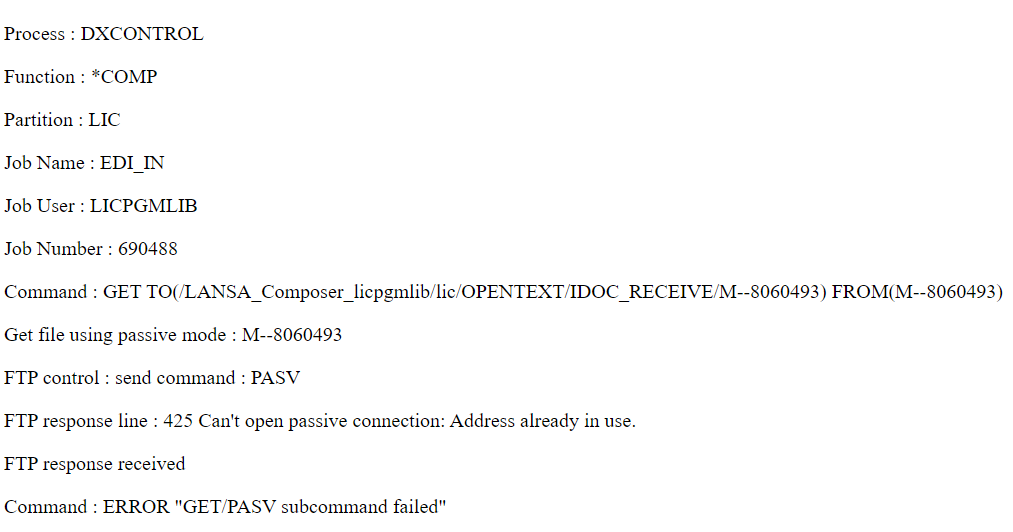
This works always OK, but after 96 times a FTP GET, the program fails.
So (as an example):
60 FTP GETs, no problem
2 FTP GETs, no problem
53 FTP GETs, no problem
> 96 FTP Gets, error when it tries FTP GET number 97
We had this year 3 times a problem with this Processing Sequence, and EVERY time it fails after 96 FTP GETs.
Has anyone came across an issue like this?
- FTP GET issue (1).png (118.71 KiB) Viewed 47664 times
- FTP GET issue (2).png (54.3 KiB) Viewed 47664 times
Kind regards,
René
Re: Composer Processing Sequence fails always after 96 FTP GET
Posted: Thu Aug 28, 2025 3:34 pm
by MarkDale
The dreaded AI, when asked about:
"ftp error 425 passive mode address already in use"
says this:
The FTP error "425 Passive mode address already in use" indicates that the FTP server, when attempting to establish a passive mode data connection, is unable to bind to a specific IP address and port because that address and port combination is already in use by another process or is in a TIME_WAIT state.
Common Causes:
Port Exhaustion/TIME\_WAIT:
When an FTP connection closes, the port used for the data connection enters a TIME_WAIT state to ensure all lingering packets are processed. If new connections are attempted too quickly, and the server runs out of available ports within its defined passive port range, this error can occur.
Firewall Interference:
A firewall (either on the server or client side) might be blocking the passive mode data connection, leading to the server's inability to establish the connection properly and thus causing the "address already in use" message as it tries to re-use a port.
Incorrect Server Configuration:
The FTP server's passive mode port range might be too small or incorrectly configured, leading to port exhaustion or conflicts.
Application-Level Issues:
The FTP client application might be attempting to re-use a socket that is still in the TIME_WAIT state, or there might be an issue with how the application handles socket binding.
Troubleshooting Steps:
Increase Passive Port Range (Server-Side):
If you manage the FTP server, increase the range of ports designated for passive mode connections to provide more available ports.
Adjust TIME\_WAIT Value (Server-Side, if applicable):
On some operating systems, the default TIME_WAIT duration can be modified to allow ports to be reused more quickly, though this should be done with caution.
Check Firewall Rules:
Ensure that firewalls on both the server and client are configured to allow the necessary passive mode data connections (typically a range of higher-numbered ports).
and some other stuff.
So on the ftp server, is the 96 limit due to the number of ports allocated?