Our first application / business object with VLF-ONE is about to go into user testing so I am cleaning up the framework (removing examples, replacing demo/sample parts, etc.).
Regarding the assistance pane, the docs say that the property for the assistance pane is in the Web/RAMP details.
However, I am not seeing that property in the Web/RAMP details.
I've looked in all the other tabs but can't seem to locate it.
Any ideas on where it may have gone?
VLF-ONE Assistance Pane
Re: VLF-ONE Assistance Pane
Our apologies – the layout manager for that screen appears to have been broken so you can’t see the Assistance pane input field as it is behind another field.
Fortunately, there is a workaround. Your framework’s definition is stored in an XML file, for example the shipped demo’s XML file is named VF_VLFONE_System.XML.
Copy your file for safety then open it with NOTEPAD or any text editor. If I open the shipped demo I see this:
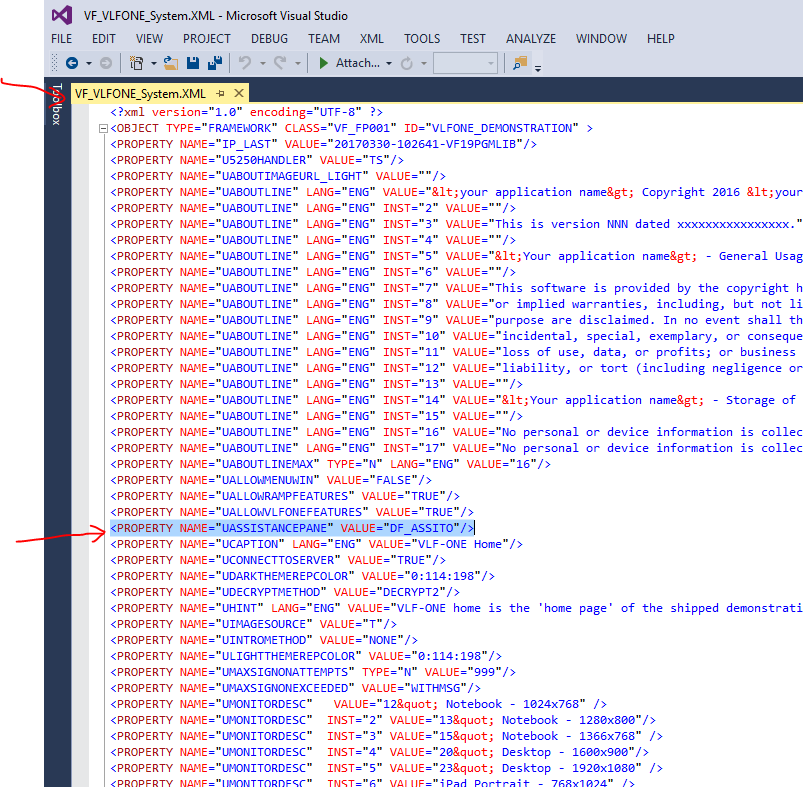
The assistance panel is controlled vy the presence or absence of this line in the XML:
To get rid of the assistance panel delete that line.
To specify an alternate assistance panel input that line somewhere near the top of your XML file.
Save the XML changes.
Open the VLF as a designer and save it to force recreation of the VLF-ONE definition .DAT files.
Fortunately, there is a workaround. Your framework’s definition is stored in an XML file, for example the shipped demo’s XML file is named VF_VLFONE_System.XML.
Copy your file for safety then open it with NOTEPAD or any text editor. If I open the shipped demo I see this:
The assistance panel is controlled vy the presence or absence of this line in the XML:
Code: Select all
<PROPERTY NAME="UASSISTANCEPANE" VALUE="XXXXXXXXX"/>
To specify an alternate assistance panel input that line somewhere near the top of your XML file.
Save the XML changes.
Open the VLF as a designer and save it to force recreation of the VLF-ONE definition .DAT files.
Re: VLF-ONE Assistance Pane
No worries. Thanks for the work around.