I created a new reusable part (i.e. BB11) which is basically a copy of our vendor's source (AB11).
In BB11, I have modified the required changes.
When I try to check-in to Master (iSeries), I am getting an error that the object is not allocated to Task Identifier TSYS. I thought a Quick Export option will resolve the issue, but still failed.
How do I allocate my object to this task?
I tried the check-out option but encountered error below. I also tried to delete my object (and hopefully recreate it), but I'm getting error as well.
How to allocate Object to task
-
René Houba
- Posts: 220
- Joined: Thu Nov 26, 2015 7:03 am
How to allocate Object to task
Hi IQHGWC,
I think your object is already connected on IBMi to another task.
First check in Windows the existing task for this component: Then go to your IBMi LANSA Housekeeping menu and select Task Option: Use option 5 on the Task the component is now allocated on: ..... Can only add 3 pictures inline per post, to see next post .......
I think your object is already connected on IBMi to another task.
First check in Windows the existing task for this component: Then go to your IBMi LANSA Housekeeping menu and select Task Option: Use option 5 on the Task the component is now allocated on: ..... Can only add 3 pictures inline per post, to see next post .......
-
René Houba
- Posts: 220
- Joined: Thu Nov 26, 2015 7:03 am
Re: How to allocate Object to task
Search for the component in the right top of the screen and use option 9 (Change Task):
Finally connect the component to the new task:
Kind regards,
René
Kind regards,
René
Re: How to allocate Object to task
Hi Rene,
Thanks for replying.
I checked on windows. Value of Task Column for my object BB11 is blanks/empty: I don't see option for Check-In too. Also, when I checked in IBMi, I don't see any objects in the Task:
Thanks for replying.
I checked on windows. Value of Task Column for my object BB11 is blanks/empty: I don't see option for Check-In too. Also, when I checked in IBMi, I don't see any objects in the Task:
- Attachments
-
- Capture_03.PNG (101.1 KiB) Viewed 89769 times
Re: How to allocate Object to task
I also get this error when I try to check-out:
Re: How to allocate Object to task
If I understand this correctly...you are logged into the IDE with task TSYS and you say you created a new RP BB11 in the IDE (by copying an existing RP AB11 I assume). And then you attempt to check this in for the first time and you get the error that the object is not allocated to Task Identifier TSYS.
Its funny that you would try to checkout then if you had just created it and it failed to checkin.
So, it looks as if the BB11 object already exist on the IBM but under a different task. Perhaps a task that your user profile isn't authorized to?
Have you checked the status of the object on the IBM in 'work with VL objects' and F11 to show taskID? And (lets assume its allocated to a different task) check in 'Work with tasks' to see if your user is an authorized user.
By the way, after the change task attempt as suggested by Rene, the last error is different to your initial error, and looks more serious (system Error: CHECK_OUT_END without DATA).
You should look for a joblog for that attempt and or report that to LANSA support.
Cheers
bark
Its funny that you would try to checkout then if you had just created it and it failed to checkin.
So, it looks as if the BB11 object already exist on the IBM but under a different task. Perhaps a task that your user profile isn't authorized to?
Have you checked the status of the object on the IBM in 'work with VL objects' and F11 to show taskID? And (lets assume its allocated to a different task) check in 'Work with tasks' to see if your user is an authorized user.
By the way, after the change task attempt as suggested by Rene, the last error is different to your initial error, and looks more serious (system Error: CHECK_OUT_END without DATA).
You should look for a joblog for that attempt and or report that to LANSA support.
Cheers
bark
-
René Houba
- Posts: 220
- Joined: Thu Nov 26, 2015 7:03 am
Re: How to allocate Object to task
Hi IQHGWC,
It is also weird that the new component that you created has an empty task.
If you start LANSA with Task Tracking and you create a new component (in your situation a copy of an existing Reusable Part), this component then should be connected to the active task.
Can you try this:
Open the RUP that has no task connected and do a dummy save. It should be connected to the active task then.
Can you then Checkin again?
Kind regards,
René
It is also weird that the new component that you created has an empty task.
If you start LANSA with Task Tracking and you create a new component (in your situation a copy of an existing Reusable Part), this component then should be connected to the active task.
Can you try this:
Open the RUP that has no task connected and do a dummy save. It should be connected to the active task then.
Can you then Checkin again?
Kind regards,
René
Re: How to allocate Object to task
Here's what I did:
For object BB11:
1. Create BB11, copy code from AB11.
2. Save, Build, Compile
3. Check-in. Error encountered.
Error Message: Object BB11 type FIELD/COMPONENT could not be processed. Task ID TSYS not allocated to object BB11. Task Tracking has restricted work that can be performed on BB11.
4. I tried to Quick Export. I thought it will fix the issue. After this, it looks like everything went downhill. Error on check-out, no option for check-in.
Work-around:
1. Create BBX11, copy code from AB11.
2. Check-in
3. Save, Build, Compile, Check-in
4. Noticed TSYS is already assigned to object.
Does it matter on the sequence between steps #2 and #3?
Is this how LANSA works? Please bear me with me. Just started on LANSA.
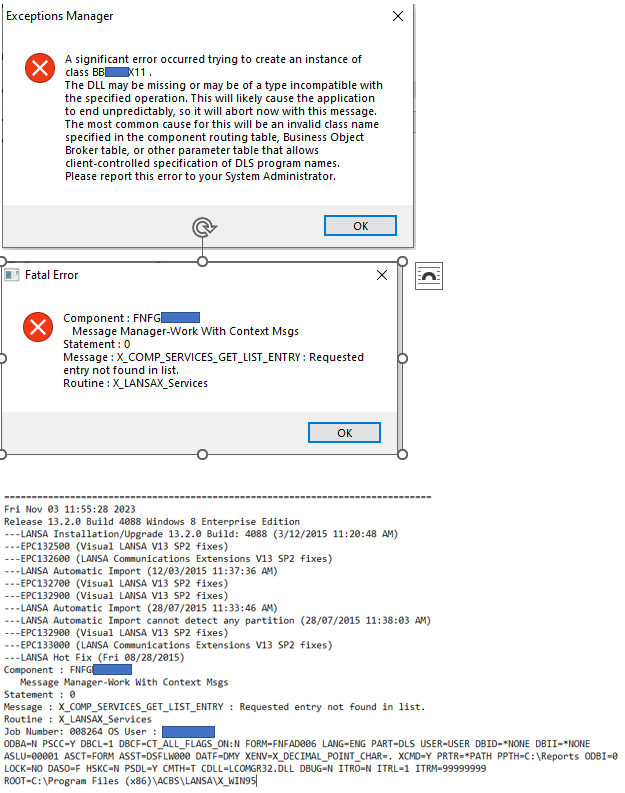
Now, I'm getting the error running the application. I'm using my new object BBX11, with exact code from AB11. I am expecting it to work like AB11.
Is there another step I need to do after the Check-In?
For object BB11:
1. Create BB11, copy code from AB11.
2. Save, Build, Compile
3. Check-in. Error encountered.
Error Message: Object BB11 type FIELD/COMPONENT could not be processed. Task ID TSYS not allocated to object BB11. Task Tracking has restricted work that can be performed on BB11.
4. I tried to Quick Export. I thought it will fix the issue. After this, it looks like everything went downhill. Error on check-out, no option for check-in.
Work-around:
1. Create BBX11, copy code from AB11.
2. Check-in
3. Save, Build, Compile, Check-in
4. Noticed TSYS is already assigned to object.
Does it matter on the sequence between steps #2 and #3?
Is this how LANSA works? Please bear me with me. Just started on LANSA.
Now, I'm getting the error running the application. I'm using my new object BBX11, with exact code from AB11. I am expecting it to work like AB11.
Is there another step I need to do after the Check-In?
Re: How to allocate Object to task
If all else fails, try to login in the ide with partition security officer and try the check in again