I am pretty sure i am missing somewhere to find the array to base64.... but in the meantime as a temporary solution simple routine can do it... a better solution maybe a widget, but most likely it should be already somewhere in the json properties.
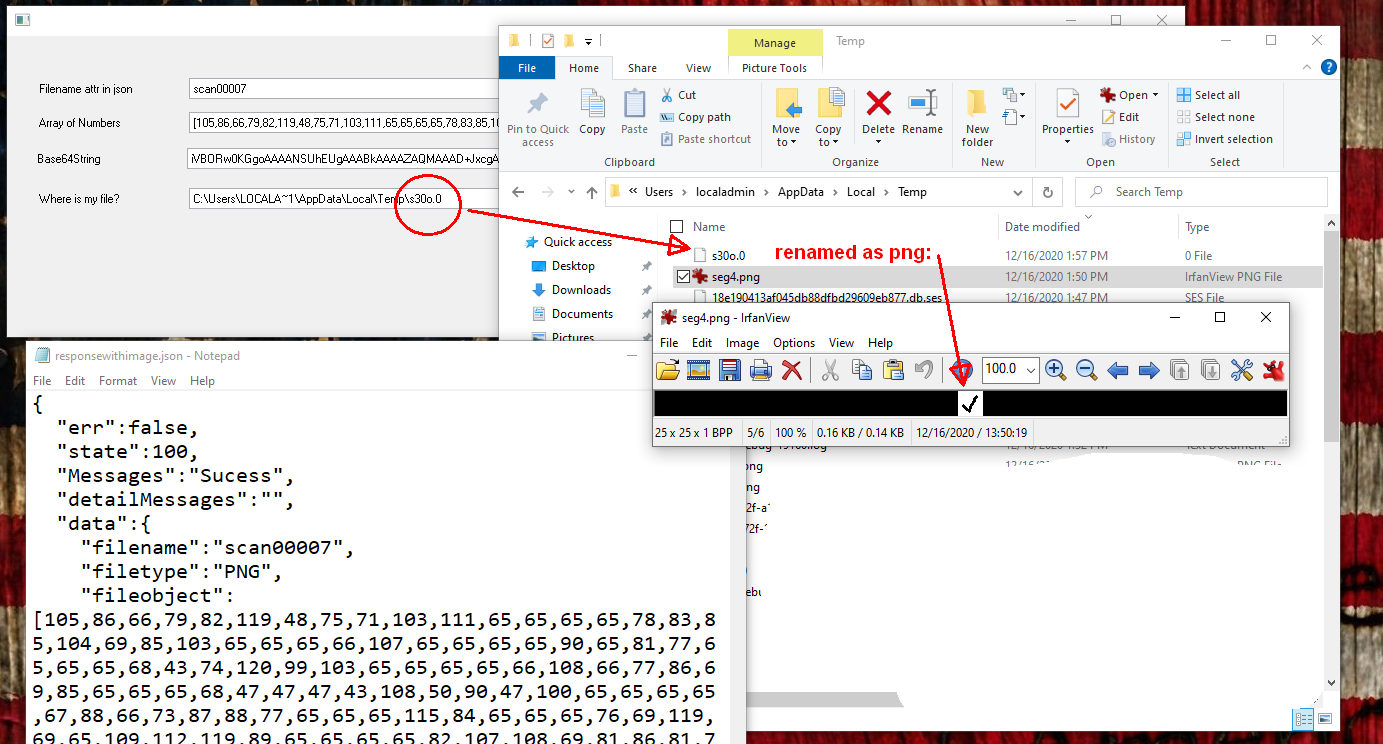
- jsonarray.png (218.78 KiB) Viewed 9642 times
I am using this .json file, which i called responsewithimage.json and placed in my images/temp folder in the webserver:
Code: Select all
{
  "err":false,
  "state":100,
  "Messages":"Sucess",
  "detailMessages":"",
  "data":{
    "filename":"scan00007",
    "filetype":"PNG",
    "fileobject":[105,86,66,79,82,119,48,75,71,103,111,65,65,65,65,78,83,85,104,69,85,103,65,65,65,66,107,65,65,65,65,90,65,81,77,65,65,65,68,43,74,120,99,103,65,65,65,65,66,108,66,77,86,69,85,65,65,65,68,47,47,47,43,108,50,90,47,100,65,65,65,65,67,88,66,73,87,88,77,65,65,65,115,84,65,65,65,76,69,119,69,65,109,112,119,89,65,65,65,65,82,107,108,69,81,86,81,73,109,87,80,52,47,47,57,47,65,119,77,71,99,82,57,69,57,73,77,73,102,105,68,120,84,120,53,69,50,77,79,73,80,50,67,105,72,107,106,56,65,67,114,43,47,81,70,73,102,80,119,73,74,68,52,56,66,104,73,47,107,111,72,69,72,50,85,103,56,89,56,100,90,66,83,89,79,65,52,105,51,109,78,89,66,65,65,104,121,107,51,120,86,79,100,74,80,119,65,65,65,65,66,74,82,85,53,69,114,107,74,103,103,103,61,61]
       }
}
In this json file, I placed a PNG file as an array of numbers (using the website
https://www.browserling.com/tools/file-to-base64 ). The image is just a very small check image. You may need to use longer strings than the default std_strng for these kind of program, this is just an example. I used a defined in the repository #longstring and #longstring2 string fields of 65535 length.
This is my form:
Code: Select all
Function Options(*DIRECT)
Begin_Com Role(*EXTENDS #PRIM_FORM) Clientwidth(1178) Clientheight(301) Componentversion(2) Left(698) Top(230)

Define_Com Class(#STD_NAME.Visual) Name(#STD_NAME) Componentversion(1) Displayposition(1) Height(21) Left(32) Parent(#COM_OWNER) Tabposition(1) Top(42) Usepicklist(False) Width(566) Caption('Filename attr in json') Labeltype(Caption)
Define_Com Class(#longstring.Visual) Name(#longstring) Componentversion(1) Displayposition(2) Left(32) Parent(#COM_OWNER) Tabposition(2) Top(76) Width(1081) Height(21) Usepicklist(False) Caption('Array of Numbers') Labeltype(Caption)
Define_Com Class(#STD_QSEL.Visual) Name(#STD_QSEL) Componentversion(1) Displayposition(3) Height(21) Left(32) Parent(#COM_OWNER) Tabposition(3) Top(152) Usepicklist(False) Width(951) Caption('Where is my file?') Labeltype(Caption)
Define_Com Class(#longstring2.Visual) Name(#longstring2) Componentversion(1) Displayposition(4) Left(30) Parent(#COM_OWNER) Tabposition(4) Top(112) Width(995) Height(21) Usepicklist(False) Caption('Base64String') Labeltype(Caption)

Evtroutine Handling(#com_owner.CreateInstance)

Define_Com Class(#XPRIM_HttpRequest) Name(#Request)
Define_Com Class(#XPRIM_UriBuilder) Name(#URL)
Define_Com Class(#XPRIM_RandomAccessJsonReader) Name(#Reader)
Define_Com Class(#XPRIM_ErrorInfo) Name(#ErrorInfo)
Define_Com Class(#XPRIM_Binary) Name(#File)

#Url.SetScheme( 'http' )
#Url.SetHost( 'localhost:8080' )
#Url.SetPath( '/images/temp/responsewithimage.json' )
#Request.DoGet Url(#Url)

* Start constructing the object
If (#Request.Response.IsSuccessfulRequest)
#Reader.SetSourceHttpResponse Httpresponse(#Request.Response) Errorinfo(#ErrorInfo)
If (#ErrorInfo.OK.IsFalse)
Return
Endif

* get state, filename
* #state := #Reader.ReadNumberWithPath( "state" )
#std_name := #Reader.ReadStringWithPath( "data/filename" ).AsNativeString

* get the array at fileobject and places it in an string
#longstring += #Reader.ReadArrayWithPath( 'data/fileobject' ).AsArray.AsString.AsNativeString

* Convert the array of numbers in a Base64String
#COM_OWNER.ArrayToBase64String Stringwitharray(#longstring) Base64string(#longstring2)

* Convert the 64basestring in a file... I cant find a #File.FromArray which will be the easier.
#File.FromBase64String String(#longstring2)

* This is just the route to the resultant file or the assignation to a blob #STD_BLOB
#STD_BLOB := #File.AsFile
#STD_QSEL := #STD_BLOB
Endif

Endroutine

Mthroutine Name(ArrayToBase64String)
Define_Map For(*INPUT) Class(#longstring) Name(#StringwithArray)
Define_Map For(*OUTPUT) Class(#longstring) Name(#Base64String)
* reads longstring which contains numbers separated by commas and put together as a base64string, removing the []
#std_count := 2
#Base64String := ''
#std_amnt := #longstring.trim.CurChars - 1
Dowhile (#std_count < #std_amnt)
#std_numl := #StringWithArray.PositionOf( ',' #std_count )
If (#std_numl = 0)
#std_num := #StringWithArray.Substring( #Std_count (#std_amnt - #std_count + 1) ).AsNumber
#Base64String += #std_num.AsChar
Leave
Else
#std_num := #StringWithArray.Substring( #Std_count (#std_numl - #std_count) ).AsNumber
#Base64String += #std_num.AsChar
#std_count := #std_numl + 1
Endif
Endwhile
Endroutine

End_Com
notice the reading of the array here, where I also moved it to a longstring (65535):
Code: Select all
* get the array at fileobject and places it in an string
#longstring += #Reader.ReadArrayWithPath( 'data/fileobject' ).AsArray.AsString.AsNativeString
basically the string reads the content of the array (which is just a list of numbers, not really Base64String until we convert that to ascii characters:
Code: Select all
[105,86,66,79,82,119,48,75,71,103,111,65,65,65,65,78,83,85,104,69,85,103,65,65,65,66,107,65,65,65,65,90,65,81,77,65,65,65,68,43,74,120,99,103,65,65,65,65,66,108,66,77,86,69,85,65,65,65,68,47,47,47,43,108,50,90,47,100,65,65,65,65,67,88,66,73,87,88,77,65,65,65,115,84,65,65,65,76,69,119,69,65,109,112,119,89,65,65,65,65,82,107,108,69,81,86,81,73,109,87,80,52,47,47,57,47,65,119,77,71,99,82,57,69,57,73,77,73,102,105,68,120,84,120,53,69,50,77,79,73,80,50,67,105,72,107,106,56,65,67,114,43,47,81,70,73,102,80,119,73,74,68,52,56,66,104,73,47,107,111,72,69,72,50,85,103,56,89,56,100,90,66,83,89,79,65,52,105,51,109,78,89,66,65,65,104,121,107,51,120,86,79,100,74,80,119,65,65,65,65,66,74,82,85,53,69,114,107,74,103,103,103,61,61]
because I cant find an array to base64 (maybe some other developer will chime here), I created my own routine for now:
Code: Select all
#COM_OWNER.ArrayToBase64String Stringwitharray(#longstring) Base64string(#longstring2)
which basically creates this string:
Code: Select all
iVBORw0KGgoAAAANSUhEUgAAABkAAAAZAQMAAAD+JxcgAAAABlBMVEUAAAD///+l2Z/dAAAACXBIWXMAAAsTAAALEwEAmpwYAAAARklEQVQImWP4//9/AwMGcR9E9IMIfiDxTx5E2MOIP2CiHkj8ACr+/QFIfPwIJD48BhI/koHEH2Ug8Y8dZBSYOA4i3mNYBAAhyk3xVOdJPwAAAABJRU5ErkJggg==
and now that this is an Base64String, we can convert this to a file easily. Note that #File is a binary. We can assign it directly to a blob:
Code: Select all
#File.FromBase64String String(#longstring2)
The blob wont have an extension and you will need to rename it after that. that is the reason for the other information in your json file. The blob file will be in %TEMP% in your computer or the temp folder in the IBM.

